ProBors vs Unusual Whales is a common question for retail researchers who want politician and insider visibility without juggling five tabs. Unusual Whales is widely known for options flow and market alerts. ProBors is built for disclosure-first research: congressional filings, Form 4 whales, signal scoring, and market context in one workspace.
This comparison is honest about where each product is strong. Neither tool is investment advice. Both surface public data for your own research process.
Quick answer
Choose Unusual Whales when your daily loop starts with options flow, unusual volume, or broad market alerts and congress is a secondary screen.
Choose ProBors when your loop starts with STOCK Act filings, insider whales, politician portfolios, and you want AI tables, watchlist alerts, and charts on the same ticker without exporting CSVs.
Many researchers use one product as primary and spot-check the other. That is normal.
Side-by-side comparison
| Capability | Unusual Whales | ProBors |
|---|---|---|
| Primary identity | Options flow and market alerts platform | Disclosure-first congress + insider research |
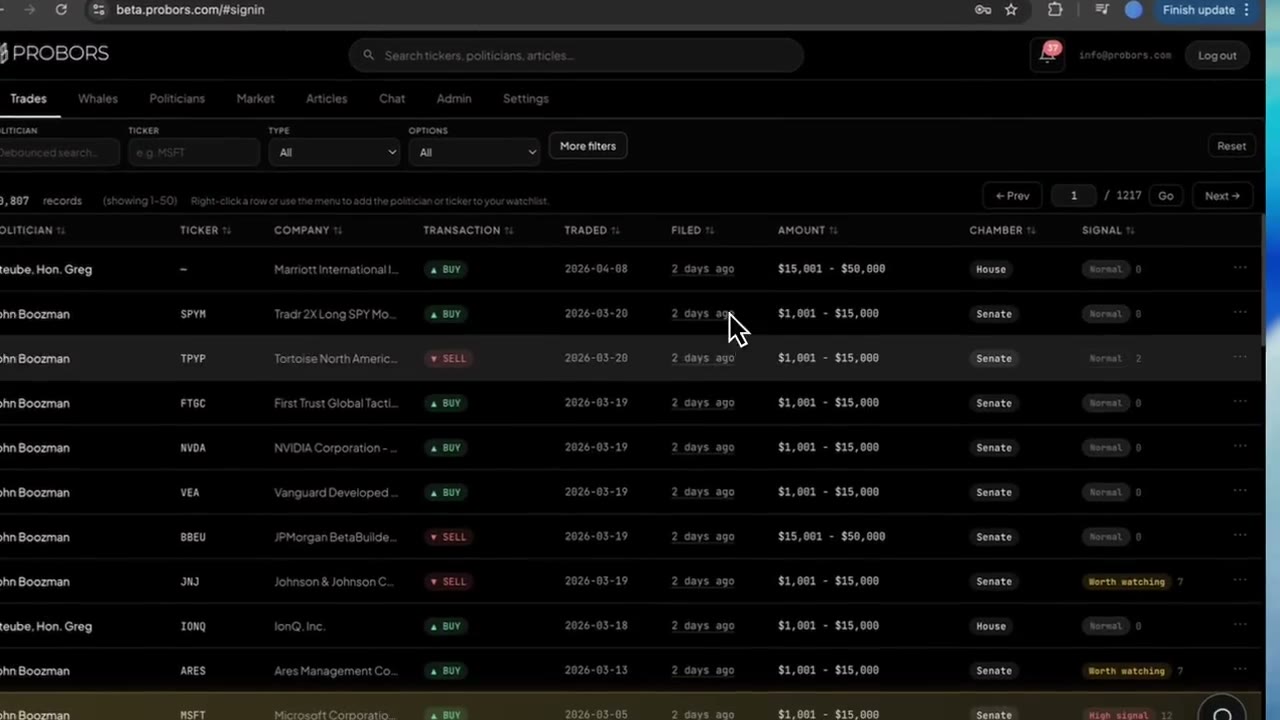
| Congressional trade search | Yes (module among broader feeds) | Core product with chamber, ticker, and politician filters |
| Insider / whale Form 4 layer | Limited relative to options focus | Integrated whale feed with context drill-down |
| Options flow / unusual activity | Strong | Not the main product scope |
| AI research on live disclosure data | Limited / different UX | Yes — table-style answers on trades and tickers |
| Watchlist + inbox alerts | Yes (alert-centric) | Yes (ticker, politician, and disclosure-driven) |
| Trade signal scores on congress rows | No | Yes |
| Market charts with disclosure markers | External or secondary | Built-in with optional congress / whale markers |
| Politician portfolio snapshots | Varies | Yes |
| Best fit | Flow-first traders who also glance at congress | Researchers who live in filings and cross-check insiders |
What Unusual Whales does well
Unusual Whales earned attention for making fast-moving market data feel accessible. Teams use it for:
- Unusual options activity and flow-style alerts
- Congress trade visibility inside a broader trading dashboard
- Social and news-adjacent features tied to retail trading culture
- A familiar interface if you already think in alerts and screens
If your thesis starts with "something unusual happened in the options tape today," Unusual Whales is often the faster starting point.
What ProBors does well
ProBors optimizes for a different question: "What did the official disclosure record say, when was it filed, and does anything else cluster on this ticker?"
Researchers use ProBors for:
- Searching House and Senate disclosures by politician, ticker, chamber, and date window
- Reviewing whale and insider transactions with filing timing and ownership context
- Opening a ticker chart with congressional or whale markers overlaid on price
- Building watchlists that map to how you actually research, not just what trended on social
- Asking AI questions that return structured tables — for example, overlap between whale buys and congress activity on one symbol
The product goal is fewer exports and fewer manual PDF hunts, not replacing your judgment.
Sample research day: same ticker, two workflows
Question: "Did politicians and insiders both show activity around a large-cap tech name this month, and how late were the filings?"
On Unusual Whales: you may see congress mentions or related alerts, then jump to a charting tool or SEC search to verify transaction date vs filing date and amount brackets.
On ProBors: filter congress trades on the ticker → open whale activity on the same symbol → compare transaction and filing dates → review signal scores → open the advanced chart with disclosure markers → add the ticker to a watchlist if the thesis holds.
The better workflow depends on whether you needed options flow first or filing verification first.
When to use Unusual Whales vs ProBors
Use Unusual Whales when you
- Trade or monitor primarily through options flow and unusual activity alerts
- Want congress data as one feed inside a market-alert product you already open daily
- Rarely need politician portfolio history, filing-lag analysis, or Form 4 drill-down on the same screen
- Already built habits around UW alert channels and do not want to migrate watchlists
Use ProBors when you
- Start research from STOCK Act or Form 4 source rows, not headlines
- Need congress, whales, and market context on one ticker without spreadsheet merges
- Want signal scores, politician portfolio snapshots, or AI-generated tables from live disclosure data
- Run a repeatable watchlist workflow: morning scan → verify filing dates → chart → alert only on follow-up criteria
- Care about separating transaction date from filing date before acting on a narrative
Consider using both when you
- Options flow flags a name intraday, but you will not size or narrate a politician/insider angle until disclosures are verified
- You publish research and want flow screenshots from one tool plus filing tables from another
- Your team splits roles: one trader watches flow, one analyst owns disclosure calendars
How to compare them fairly during a trial
Do not judge either tool on a viral screenshot. Run the same checklist on both:
- Pick one ticker you already follow.
- Find the most recent congressional disclosure row for that ticker.
- Log transaction date, filing date, amount range, and owner field.
- Open the original government source link when available.
- Check whether insider or whale filings cluster in the same 30–60 day window.
- Note how many clicks it took and whether alerts can target that ticker specifically.
ProBors is designed to keep steps 2–5 inside one product. Unusual Whales may be faster if step zero is options flow, not a PTR row.
Limits both tools share
Public disclosure data has structural limits no UI can remove:
- Amounts are often ranges, not exact dollars.
- Filing lag means the market may have moved before you see the row.
- A politician or insider trade does not prove material nonpublic information or future price direction.
- Amendments and owner-field nuances can change how a line item should be read.
Treat both platforms as research accelerators, not signal generators.
FAQ
Is ProBors an Unusual Whales clone?
No. ProBors does not try to replicate full options-flow infrastructure. It goes deeper on congressional and insider disclosure workflows, signal scoring, and AI tables tied to those feeds.
Does Unusual Whales have fresher congress data?
Ingestion schedules differ by vendor. During a trial, compare the same politician and ticker on both platforms and note filing timestamps and source links. Freshness matters less than whether you can verify dates and sources quickly.
Which is better for a congress-only researcher?
If you rarely use options flow, a disclosure-first tool is usually less noisy. ProBors, Capitol Trades-style trackers, or official House and Senate portals may fit better than a flow-centric dashboard.
Which is better if I only care about whale-sized insider buys?
If you never research congress, a pure insider scanner may suffice. If you already follow politician trades, ProBors reduces duplicate logins by keeping whales and congress on one ticker page.
Is either platform investment advice?
No. Both surface public market and disclosure data for research. Position sizing, compliance, and final decisions are yours.
Compare ProBors on a ticker you already watch
Run congress, whale, and chart context in one session at probors.com.
Get startedRelated reading
Sources & methodology
Last updated:
ProBors uses public disclosure records, SEC filings, House and Senate financial disclosure portals, market data, and in-product workflow checks. Articles are written as research education, not investment advice.