The best insider trading tracker for you depends on whether you need a free Form 4 scan, paid screening depth, social-style flow alerts, or a workspace that also covers congressional disclosures. No single site wins every use case. This 2026 comparison maps five common approaches—OpenInsider, Fintel, Unusual Whales, DIY SEC EDGAR, and ProBors—so you can match the tool to how often you research and what you cross-check. This is research context, not investment advice.
Best insider trading trackers at a glance
| Tool | Best for | Form 4 / insider depth | Congress overlap | Alerts & watchlists | Market + signal context | Typical price |
|---|---|---|---|---|---|---|
| OpenInsider | Free daily insider scans | Strong tables, cluster views | No | Limited / none | External charts | Free |
| Fintel | Paid insider + ownership screens | Strong filters, institutional overlap | Limited add-ons | Email / saved screens | Charts bundled | Paid |
| Unusual Whales | Flow, options, and headline-driven alerts | Insider as one feed among many | Yes (separate product areas) | Strong push / Discord style | Options-heavy | Paid tiers |
| SEC EDGAR (DIY) | Zero-cost source verification | Raw filings only | STOCK Act via separate search | Manual | None built-in | Free |
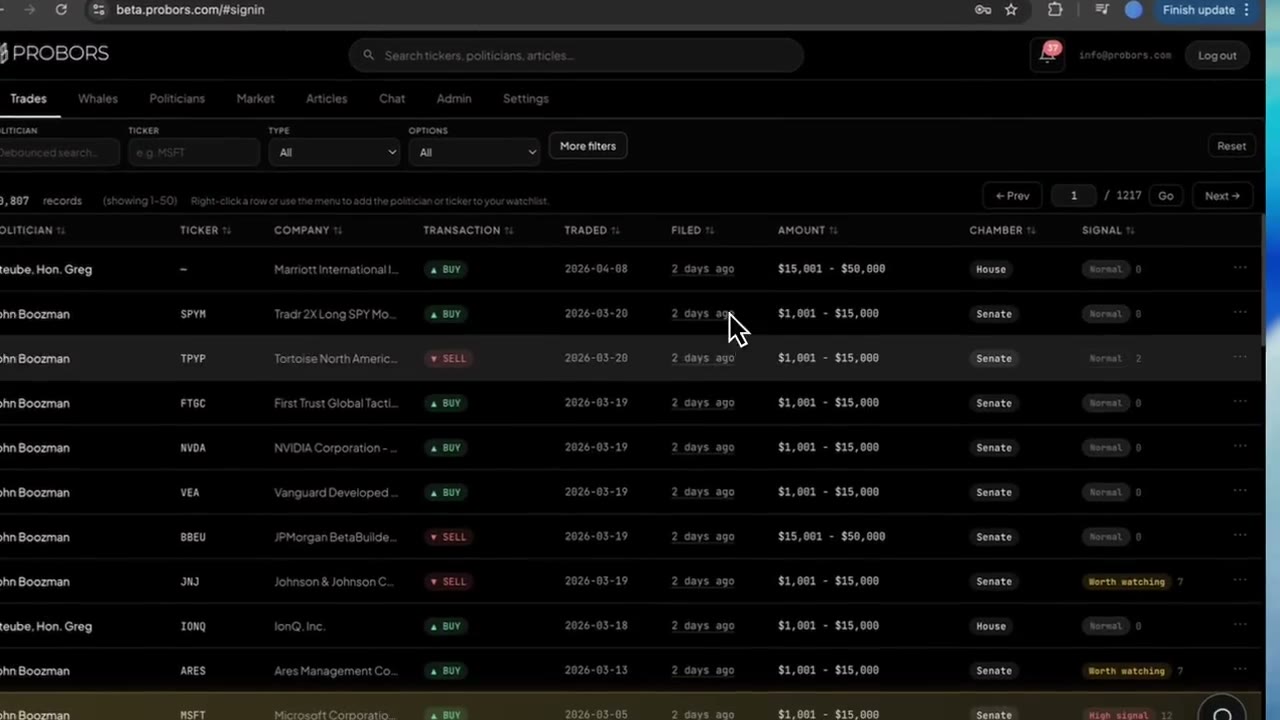
| ProBors | Disclosure-first daily loop | Insider whales + drill-down | Yes — same ticker workspace | Watchlist inbox | Built-in charts + signal scores | Freemium / paid |
What each tracker does well
OpenInsider — best free starting point
OpenInsider remains the default bookmark for researchers who want recent insider purchases and sales without creating an account. Sort by filing date, transaction date, ticker, or insider role; use cluster views when several officers file in the same window. The trade-off is workflow: no congressional layer, no persistent watchlist inbox, and charts live outside the tool.
Fintel — best for screened insider + ownership research
Fintel suits users who already pay for equity research and want insider transactions filtered alongside institutional holders, short interest, and similar datasets. Screens can be saved and re-run. Congress disclosures are not the core product—plan on a second tool if politician trades matter to your thesis.
Unusual Whales — best when options flow drives your day
Unusual Whales built its audience around options activity, congressional feeds, and alert culture. Insider rows appear in a broader "what is moving" frame rather than a pure Form 4 archive. Strong if you want push notifications and community context; weaker if you need calm, filing-by-filing verification without noise.
SEC EDGAR — best for source truth and compliance-style checks
Pulling Form 4 filings directly from SEC EDGAR is slow but authoritative. Researchers use EDGAR when a table row looks wrong, when counsel wants a primary source, or when budget is zero. You trade speed and alerts for certainty.
ProBors — best when insiders share a ticker with congress or whales
ProBors targets researchers who stack insider whale rows, House and Senate disclosures, signal scores, watchlists, and market charts on one symbol without exporting CSVs. It is not trying to replace a pure options-flow terminal; it is built for repeat disclosure triage.
Capability comparison (five features that matter)
| Capability | OpenInsider | Fintel | Unusual Whales | SEC EDGAR | ProBors |
|---|---|---|---|---|---|
| Recent insider buy/sell tables | Yes | Yes | Partial / feed-style | Manual search | Yes |
| Cluster or size-based triage | Cluster views | Screen-based | Alert-driven | Manual | Whale + signal scoring |
| Congressional trades on same ticker | No | Limited | Separate modules | Separate STOCK Act search | Yes |
| Watchlist notifications | No | Varies | Strong | No | Yes |
| AI or natural-language tables on filings | No | Limited | Varies | No | Yes |
When to choose each
Choose OpenInsider if you check insider activity a few times a month and do not need alerts or politician overlap.
Choose Fintel if you already subscribe for ownership and insider screens and rarely touch congressional data.
Choose Unusual Whales if options flow, push alerts, and a social research loop matter more than quiet Form 4 archive browsing.
Choose SEC EDGAR when you must verify a specific filing, audit a vendor row, or cannot pay for software.
Choose ProBors when Form 4 rows are step one in a daily process that also asks: "Did anyone in Congress file on this ticker?" and "What did price do between transaction date and filing date?"
Many desks run OpenInsider or EDGAR for spot checks and ProBors for the repeat loop—that overlap is normal, not failure.
How to evaluate any insider tracker in one sitting
Before you pay for a annual plan, run the same ticker through each finalist:
- Note the most recent insider purchase — transaction date, filing date, and role.
- Compute filing lag in plain days (filed date minus trade date).
- Ask whether congressional disclosures exist on that symbol in the last 90 days.
- Check whether alerts would have fired on filing date, not just transaction date.
- Open a price chart from transaction date forward — did the market move before you could have seen the filing?
If a tool fails step 3 and congress matters to you, keep a second tab or switch to a combined workspace.
What this comparison does not prove
A tracker ranking does not tell you whether insider activity predicts returns, whether a specific officer had material nonpublic information, or whether a filing was timely under SEC rules. Public Form 4 and STOCK Act rows are disclosure documents, not trade recommendations. Always verify amounts, dates, and transaction codes against the original filing.
FAQ
Is OpenInsider still the best free insider tracker?
For quick Form 4 tables without an account, yes—many researchers still start there. It is not the best fit when you need watchlist alerts, whale sizing, or congressional overlap on the same ticker.
Do I need a paid insider tracker if I use SEC EDGAR?
Not necessarily. EDGAR is enough for occasional verification. Paid tools earn their keep when you run the same filters daily, want push alerts, or combine insider rows with other disclosure layers.
How is ProBors different from Unusual Whales for insiders?
Unusual Whales emphasizes flow, options, and alert-driven research culture. ProBors emphasizes a disclosure workspace: insider whales, congress trades, signal scores, and charts on one ticker with less feed noise.
Can I use multiple insider trackers at once?
Yes. A common pattern is OpenInsider or Fintel for a quick scan, EDGAR for verification, and ProBors when a ticker graduates to your daily watchlist.
Is congressional trading data the same as insider Form 4 data?
No. Members of Congress file under STOCK Act periodic transaction reports (PTRs), not Form 4. Good research tools label the source chamber and filing type so you do not mix rulesets.
Track insiders and congress in one workspace
Form 4 whales, STOCK Act filings, signal scores, and watchlists—on ProBors.
Get startedRelated reading
- OpenInsider vs ProBors
- Form 4 insider buying tracker guide
- ProBors vs Fintel disclosure workflow
- How to triage whale transactions on ProBors
Sources
- SEC EDGAR search — primary repository for Form 3, 4, and 5 insider filings
- SEC Form 4 overview — field definitions and filing rules
- House Clerk financial disclosure — STOCK Act periodic transaction reports
- Senate financial disclosure search — Senate PTR filings
- Rows were checked in ProBors and should be verified against the original filing.
- Data ingestion status: probors.com/status
Sources & methodology
Last updated:
ProBors uses public disclosure records, SEC filings, House and Senate financial disclosure portals, market data, and in-product workflow checks. Articles are written as research education, not investment advice.