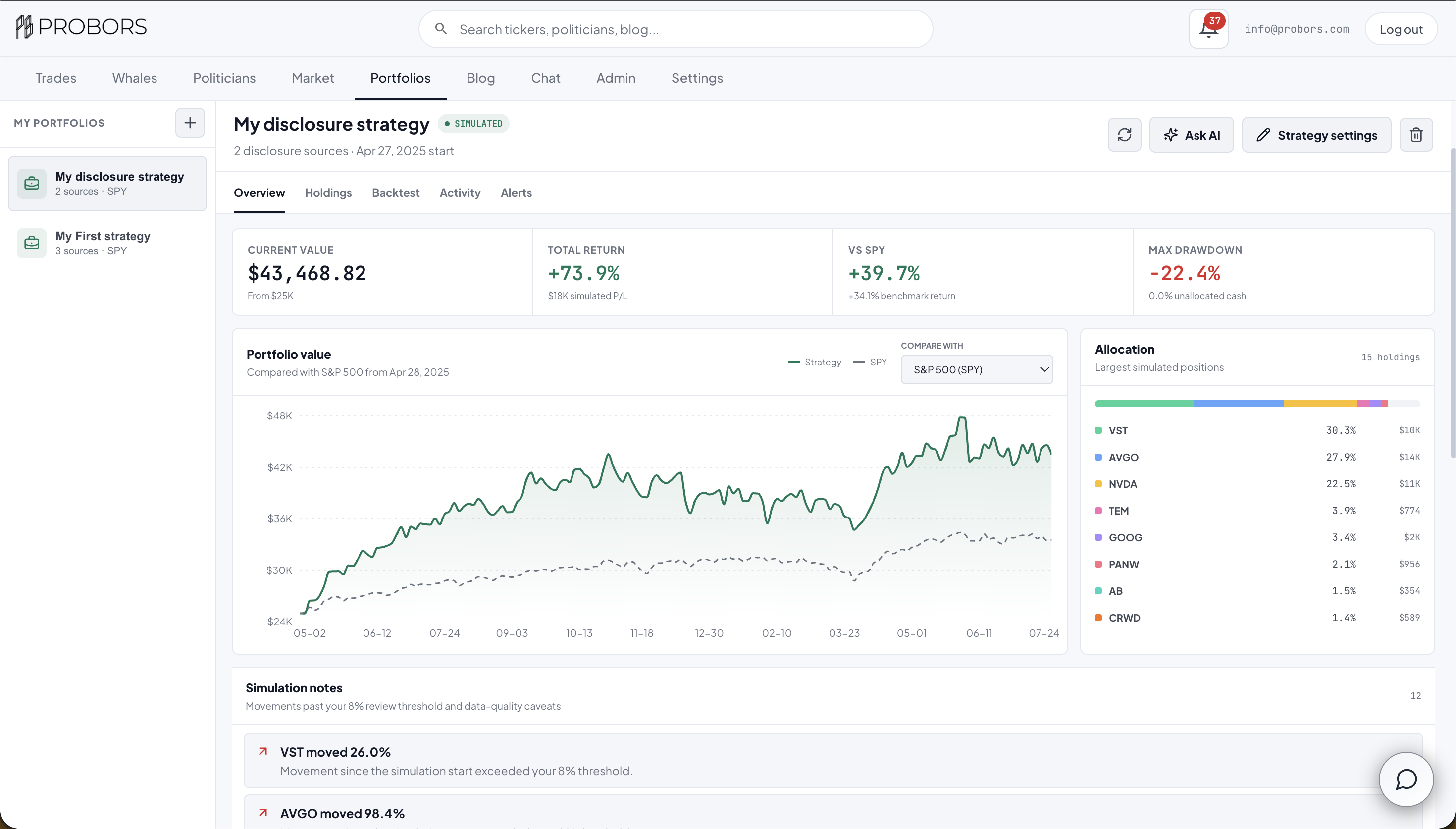
The ProBors portfolio strategy builder lets you combine politician portfolio snapshots with individual stocks, assign source weights, remove unwanted tickers, and simulate the resulting basket against a market benchmark. You can then follow the saved strategy for new matching congressional disclosures in the ProBors inbox and by email. It is a virtual research workspace—not a brokerage account, automatic trading system, or promise of future returns.
Quick answer
Open Portfolios in the signed-in ProBors dashboard and click Create portfolio. Give the strategy a name, starting capital, simulation date, and benchmark. Add one or more politicians with available portfolio snapshots, optionally mix in direct stock positions, then make the source weights total 100%. Set concentration rules, ticker exclusions, and disclosure alerts before saving.
Once saved, the workspace resolves the selected sources into stock holdings and shows:
- Simulated value, return, drawdown, and profit or loss
- Strategy performance beside SPY, QQQ, or another benchmark
- Position-level target weight, value, P/L, price, and source
- Editable source weights and ticker exclusions
- New congressional disclosures matching the strategy
- AI-assisted inspection and explicit strategy changes through ProBors Chat

Real ProBors product capture of a saved virtual strategy. The values shown are simulated research output, not brokerage-account performance or expected returns.
What is a ProBors portfolio strategy?
A ProBors strategy is a saved set of research instructions for building a virtual stock basket.
Each strategy can contain two source types:
| Source | What it contributes |
|---|---|
| Politician | Eligible stock positions from that politician's latest available ProBors portfolio snapshot |
| Stock | A direct ticker allocation that remains in the strategy independently of politician holdings |
You decide how much each source contributes. For example, a research strategy could allocate 45% to one politician's disclosed holdings, 30% to another politician, and 25% directly to NVDA. ProBors combines overlapping symbols, applies your maximum-position rule, removes excluded tickers, and calculates the resulting allocation.
Whale or institutional sources are not currently available in the strategy builder. The feature is designed around politician portfolio snapshots and direct listed stocks.
How this differs from politician portfolios and watchlists
These ProBors tools answer different questions:
| Tool | Main question | Custom weights? | Simulation? | New filing alerts? |
|---|---|---|---|---|
| Politician portfolio | What does this politician's disclosed portfolio look like? | No | Portfolio-level performance context | Yes, when followed |
| Watchlist | Did a person or ticker appear in a new filing? | No | No | Yes |
| Custom portfolio strategy | What would a controlled basket built from these politicians and stocks look like? | Yes | Yes | Yes |
Use a politician profile when you want to study one member as reported. Use a watchlist when you only need filing notifications. Use a portfolio strategy when you want to combine sources, control concentration, compare a basket with a benchmark, and review the holdings as one research system.
Step 1: Set the simulation basics
The first builder step defines the portfolio:
- Portfolio name and optional research thesis
- Starting capital in USD
- Simulation start date
- Performance benchmark
Available benchmark choices include:
| Benchmark | Research comparison |
|---|---|
| SPY | S&P 500 large-cap U.S. equities |
| QQQ | Nasdaq-100 growth and technology |
| DIA | Dow Jones blue-chip companies |
| IWM | Russell 2000 smaller U.S. companies |
| VTI | Broad U.S. equity market |
| VT | Global equities |
| GLD | Gold exposure |
| BIL | Short-term U.S. Treasury bills |
Choose a benchmark that matches the question you are asking. A technology-heavy strategy may be more informative beside QQQ than SPY, while BIL can provide a cash-like reference. The benchmark line uses the same comparison period as the strategy when usable price history is available.
Step 2: Add politicians and stocks
The Sources step is where the strategy takes shape.
When you search for a politician, ProBors shows members with available portfolio snapshots, profile photos, disclosure counts, and ticker coverage. A shortcut beside each result opens the politician's full portfolio so you can inspect it before adding the source.
You can also search for a ticker or company and add it as a direct stock source. Every source receives a percentage weight, and the total must equal 100% before the portfolio can be saved. Use Balance evenly for a quick starting point, then adjust individual weights to match the research question.
A source weight is not the same as a final stock weight. If a politician contributes several holdings, their source allocation is distributed across eligible positions. When two politicians hold the same ticker, ProBors merges those contributions before applying the maximum-position rule.
Step 3: Control concentration and exclusions
Portfolio rules help stop one large disclosed position from silently dominating the basket:
- Maximum stock weight caps an individual ticker after all sources are combined.
- Holdings per politician limits how many of each politician's largest eligible positions enter the simulation.
- Movement review threshold flags holdings whose simulated return moves beyond a percentage you choose.
- Rebalance frequency can be set to monthly, quarterly, or no scheduled rebalance.
- Excluded securities removes a ticker even if a selected politician holds it.
These controls modify the virtual strategy only. They do not change or hide the underlying politician disclosure in the Trades feed or politician profile.
Step 4: Inspect and edit resolved holdings
The Holdings tab shows what the source rules actually produced. This is where the strategy becomes concrete.
Each position displays:
- Ticker and company
- Politician or direct-stock sources behind the position
- Target allocation and simulated starting value
- Current simulated value and share count
- Dollar P/L and percentage return
- Current price and simulation entry price
You can edit a target weight, add another politician or stock, remove a direct stock, or exclude a ticker contributed by a politician. Changes remain unsaved until you click Save strategy, making it possible to review the whole basket before updating the stored configuration.
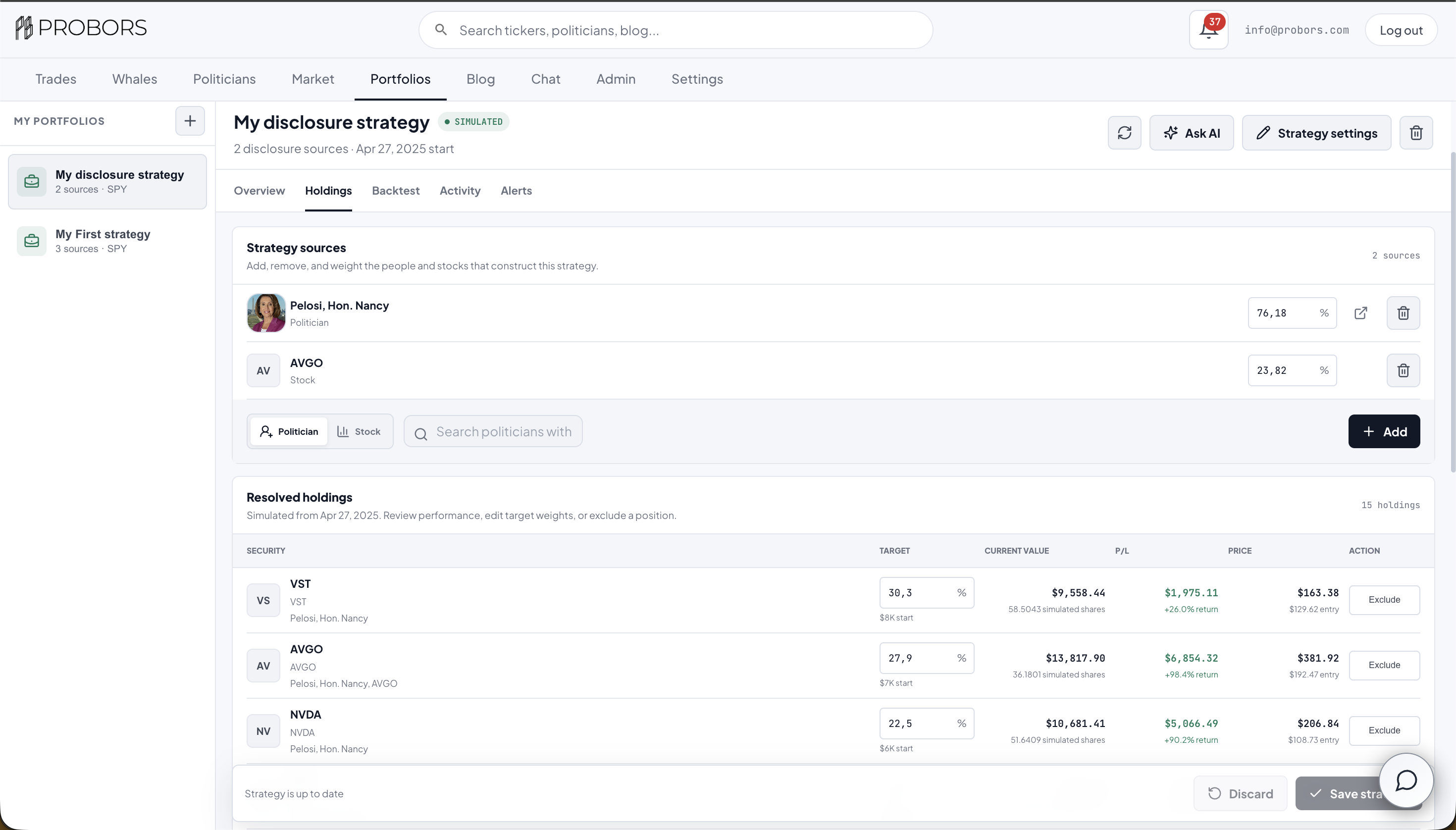
Real ProBors product capture of the holdings editor. Position values and P/L are virtual simulation results, not a live portfolio recommendation.
Step 5: Compare the strategy with a benchmark
The Overview and Backtest tabs summarize the virtual basket.
The top metrics show:
- Current simulated value
- Total return and simulated P/L
- Return difference versus the selected benchmark
- Maximum peak-to-trough drawdown
- Unallocated cash when position rules prevent a full allocation
The chart draws the strategy and benchmark over the same comparison window. You can change the benchmark directly from the chart area, and ProBors recalculates the benchmark return rather than relabeling an existing line.
Below the chart, the allocation panel shows the largest simulated positions. Source contribution explains how many eligible holdings each politician or direct stock contributed and how much source weight was assigned.
Step 6: Follow the strategy for new disclosures
During setup, enable Follow this strategy to monitor new congressional filings that match:
- A politician included as a source
- A ticker included directly or resolved from a source
- The strategy's exclusion rules
Matching disclosures appear in the strategy's Alerts tab. Email delivery can be enabled separately. Alerts begin when the strategy is saved; ProBors does not send old historical filings as if they were new.
Step 7: Ask AI about a saved strategy
Click Ask AI from a saved portfolio to open ProBors Chat with the strategy already named in the prompt.
The AI can inspect:
- Sources and source weights
- Resolved holdings and position metrics
- Benchmark and performance comparison
- Excluded tickers and custom holding weights
- Construction rules
- Recent strategy alerts
It can also modify a saved strategy when you explicitly request a concrete change, such as excluding a ticker, changing a weight, or adding a stock. ProBors requires an explicit instruction before using the modification tool; asking for analysis alone does not change the strategy.
A useful prompt is:
Show me my saved strategy "Disclosure Leaders." Summarize its concentration, benchmark comparison, largest holdings, exclusions, and recent alerts. Identify positions that deserve additional research based on the available metrics.
Treat the answer as research triage. The AI does not know your financial situation and should not be treated as personalized investment advice.
How the simulation works
The current ProBors methodology is a snapshot-basket simulation:
- ProBors resolves the currently available holdings for each selected politician.
- It keeps the configured number of eligible holdings per source.
- It applies source weights, merges duplicate tickers, removes exclusions, and caps concentration.
- It uses historical closing prices from the selected start date through the latest available date.
- It compares the resulting virtual basket with the selected benchmark.
This means the simulation applies the currently resolved source basket from the chosen start date. It does not reconstruct every historical portfolio change, exact execution price, tax effect, fee, cash flow, option contract, or brokerage fill.
That limitation matters. Congressional disclosures can contain amount ranges, can arrive after the transaction date, and may include assets without a clean public ticker. A clean backtest line is not evidence that the same allocation was known or executable on the historical start date.
What this feature does not do
ProBors Portfolios does not:
- Connect to a brokerage or move money
- Automatically copy a politician's trades
- Guarantee that a disclosure represents a current holding
- Reconstruct every historical transaction with exact prices
- Turn filing activity into a buy or sell recommendation
- Predict future returns from prior simulated performance
The feature is best used to structure a research question: define the people and stocks you care about, reveal the resulting concentration, compare it with an appropriate benchmark, then monitor the next public disclosure.
A practical strategy research workflow
One useful process is:
- Open politician portfolio snapshots and verify that the selected members have relevant holdings coverage.
- Create a small strategy with two or three sources rather than adding everyone at once.
- Choose a benchmark that reflects the basket's exposure.
- Set a maximum ticker weight before reading simulated returns.
- Open Holdings and inspect which source produced each position.
- Exclude securities that do not fit the research thesis.
- Review drawdown and benchmark-relative performance, not return alone.
- Enable new-disclosure alerts.
- Verify any alert against the original House or Senate filing before citing or acting on it.
FAQ
Can I create more than one strategy?
Yes. Saved strategies appear in the left portfolio list so you can separate different research questions, benchmarks, source combinations, and alert rules.
Can I combine politicians and individual stocks?
Yes. Politicians and direct stocks can be mixed in one strategy, provided source weights total 100%.
Can I add whale or institutional portfolios?
Not currently. The strategy builder supports politicians with available portfolio snapshots and individual stock tickers.
Are portfolio values real money?
No. Starting capital, position values, share counts, returns, and P/L are simulated research values.
Why is a benchmark missing?
A benchmark line requires usable historical prices during the comparison period. ProBors shows a data warning when it cannot load enough benchmark history rather than presenting a flat or invented comparison.
Do alerts include historical trades?
No. Strategy alerts begin when following is enabled and the strategy is saved. Historical filings remain available in the relevant ProBors research views but are not delivered as new alerts.
Can AI change my strategy automatically?
Only after an explicit modification request. Asking the AI to summarize or evaluate a strategy does not authorize a configuration change.
Build a disclosure-based portfolio strategy
Combine politician snapshots and stocks, control concentration, compare the virtual basket with a benchmark, and follow the next matching filing in ProBors.
Get startedRelated reading
- Track politician stock portfolios on ProBors
- Read politician portfolio gains versus the S&P 500
- Use the ProBors AI research assistant
- Set up ProBors watchlists and alerts
- Why congressional amount ranges are not exact dollars
Sources and methodology
- House Clerk Financial Disclosure search — official House financial disclosure portal
- Senate eFD search — official Senate financial disclosure portal
- STOCK Act bill text — congressional disclosure framework
- SEC EDGAR search — primary source for public company filings used elsewhere in ProBors research
- ProBors data status — current disclosure and market-data ingestion status
- Screenshots in this guide are real ProBors product captures. Displayed portfolio values remain virtual simulation outputs.
This is research context, not investment advice.
Sources & methodology

Last updated:
ProBors uses public disclosure records, SEC filings, House and Senate financial disclosure portals, market data, and in-product workflow checks. Articles are written as research education, not investment advice.