Researching a ticker across the House and Senate means asking the same symbol question twice—once per chamber—because PTR and periodic reports follow different calendars, lag patterns, and batch sizes. ProBors lets you filter congressional trades by ticker and chamber, compare filing lag side by side, and see whether activity clusters in one body or spreads across both. This seven-step workflow walks through that cross-chamber check without treating a Senate batch filed today as if it were a same-day House PTR. This is research context, not investment advice.
Why one ticker search is not enough
A ticker filter answers "who reported this symbol?" It does not automatically separate House PTR timeliness from Senate periodic batches that may cover trades from weeks earlier.
Researchers split by chamber because:
- Filing lag differs. House rows often land within a few days of the trade; Senate lines in recent ProBors data commonly show 20–35 days between transaction and filing dates.
- Batch shape differs. One senator can file dozens of lines on a single date; House members often file smaller PTR sets closer to each trade.
- Committee overlap differs. House and Senate members rarely sit on identical panels, so cross-chamber activity on the same ticker is not redundant—it is complementary context.
- Signal labels are row-level, not chamber-level. A Worth watching Senate purchase and a Normal House sale in the same ticker can coexist; merging them into one narrative hides the lag and size story.
Cross-chamber research is how you avoid headlines like "Congress bought PLTR this week" when the purchase was a May Senate trade disclosed in mid-June alongside unrelated House partial sales.
Seven-step workflow on ProBors
-
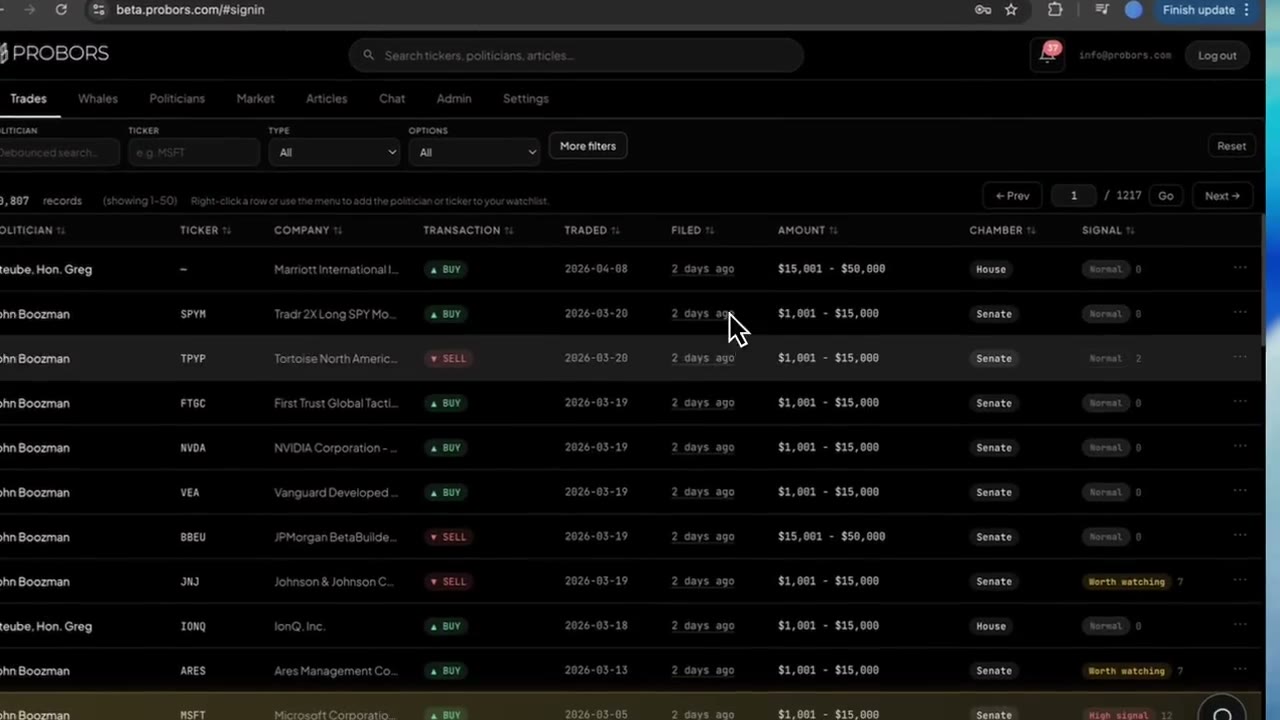
Start from your ticker question. Open probors.com, go to Congressional trades, and search or filter by the ticker you care about—whether it is a mega-cap you already watch or a name that appeared in a news alert.
-
Run the House view first. Apply a House source filter on the same ticker. Sort by filing date descending to see what became public recently. Note transaction date, amount bracket, and transaction type on each row.
-
Run the Senate view separately. Clear or switch the source filter to Senate on the identical ticker. Expect fewer rows and longer median lag. Do not assume the Senate list is "older" because it is shorter—check dates per line.
-
Log disclosure lag per chamber. For each row you might cite, record calendar days from transaction date to filing date. Compare House and Senate medians for that ticker rather than judging one row against the other chamber's typical speed.
-
Read signal labels in chamber context. A Worth watching label on a Senate purchase with a 30-day lag answers a different question than a Normal House sale filed the next business day. Open row detail for signal reasons, then verify against the linked source PDF.
-
Add politician and market context. From any row, open the member profile to see other recent activity. Optionally open the market workspace for the ticker to place disclosures next to price action—remembering that long-lag Senate rows may have already been priced in.
-
Watchlist after verification. Add the ticker (or specific politicians) to a watchlist only after you have confirmed dates and types in the original filing. Cross-chamber research is retrospective; alerts fire on new filings going forward.
Examples from recent filings: PLTR across chambers
Recent filings in ProBors as of June 29, 2026 show why a single ticker search should split by chamber. Palantir (PLTR) had both a Senate purchase batch and House partial sales disclosed within the same late-spring window—same symbol, different lag and signal stories.
| Politician | Chamber | Type | Traded | Filed | Lag | Amount range | Signal |
|---|---|---|---|---|---|---|---|
| John Boozman | Senate | Purchase | May 15, 2026 | June 16, 2026 | 32 days | $1,001 - $15,000 | Worth watching |
| Gilbert Cisneros | House | Sale (Partial) | May 15, 2026 | June 5, 2026 | 21 days | $1,001 - $15,000 | Normal |
| Gilbert Cisneros | House | Sale (Partial) | May 8, 2026 | June 5, 2026 | 28 days | $1,001 - $15,000 | Normal |
| Gilbert Cisneros | House | Purchase | April 14, 2026 | May 7, 2026 | 23 days | $15,001 - $50,000 | Normal |
How to read this without merging chambers:
- Boozman (Senate, Worth watching) reflects a May 15 purchase first disclosed June 16—a 32-day lag typical of Senate periodic reporting. The elevated label reflects row-level context in ProBors, not a claim that the trade was timely.
- Cisneros (House, Normal) filed partial sales June 5 for May trades—faster than the Senate batch but still multi-week lag on some lines. Same calendar week as filing does not mean same trade date as Boozman.
- Cross-chamber takeaway: PLTR had Senate buying and House selling in overlapping windows. That is a research lead for committee context and portfolio questions—not a single "Congress is bullish/bearish" verdict.
Use a table like this as a template: filter ticker → split chamber → compare lag and type → verify PDF → then decide what deserves follow-up.
Common mistakes in cross-chamber ticker research
- Pooling House and Senate into one timeline sorted only by filing date. Senate batches can dominate "recent" sorts while reflecting older trades.
- Ignoring partial sales and options. House lines marked partial or option-related are not interchangeable with outright purchases in the other chamber.
- Assuming two members trading the same ticker are coordinated. Cross-chamber overlap is common on liquid names; linkage requires evidence beyond matching symbols.
- Skipping amount brackets. A $1,001–$15,000 Senate line and a $15,001–$50,000 House line carry different weight in portfolio interpretation.
- Citing filing week as trade week. Always lead notes with transaction date and state lag explicitly.
For chamber-specific portal habits, see House stock trading tracker and Senate stock trading tracker. For date discipline, see how to compare filing date vs transaction date.
FAQ
Should I research House or Senate first on a ticker?
Start with House if you care about timeliness and same-week price relevance. Start with Senate if you are auditing periodic batches or studying members who file large multi-line reports. Always run both before concluding.
Does ProBors show House and Senate trades on one combined list?
Yes, but for research you should filter by chamber on the same ticker. A combined sort by filing date alone can make Senate lagging batches look like fresh activity.
What if only one chamber has rows for my ticker?
That is common on smaller names. Document the absence: "No Senate PLTR rows in the last 90 days" is useful context. Expand the date window before assuming no activity.
How does cross-chamber research relate to signal scores?
Signal scores apply per row. A Worth watching Senate line does not upgrade or downgrade House rows in the same ticker. Compare labels after splitting chambers.
Can I set watchlist alerts per chamber?
Watchlist alerts fire on new activity for tracked tickers or politicians. Cross-chamber discipline still matters when the alert arrives—open the row and check chamber, transaction date, and lag before updating your thesis.
Split House and Senate on any ticker
Filter congressional disclosures by ticker and chamber on ProBors, compare filing lag, and verify each row against the source PDF.
Get startedRelated reading
- How to track congressional stock trades by ticker
- How to compare filing date vs transaction date
- House stock trading tracker
- Senate stock trading tracker
- How to filter congress trades by signal score
Sources
- House Clerk Financial Disclosure (PTR) search
- Senate Financial Disclosures (eFD)
- STOCK Act (Pub. L. 112-105)
- Rows were checked in ProBors and should be verified against the original filing.
- For ingestion health, see ProBors data status.
Sources & methodology
Last updated:
ProBors uses public disclosure records, SEC filings, House and Senate financial disclosure portals, market data, and in-product workflow checks. Articles are written as research education, not investment advice.