OpenInsider is the default free starting point for many Form 4 researchers. ProBors targets a broader disclosure loop: insider whales, congressional trades, signal scoring, watchlists, and market context on the same ticker. If you only need a quick scan of recent insider purchases, OpenInsider may be enough. If you cross-check insiders against politician filings, cluster activity, or build daily watchlists, the workflow gap shows up fast. This is research context, not investment advice.
Quick answer
Choose OpenInsider when you want a free, fast table of recent insider buys and sells with minimal setup.
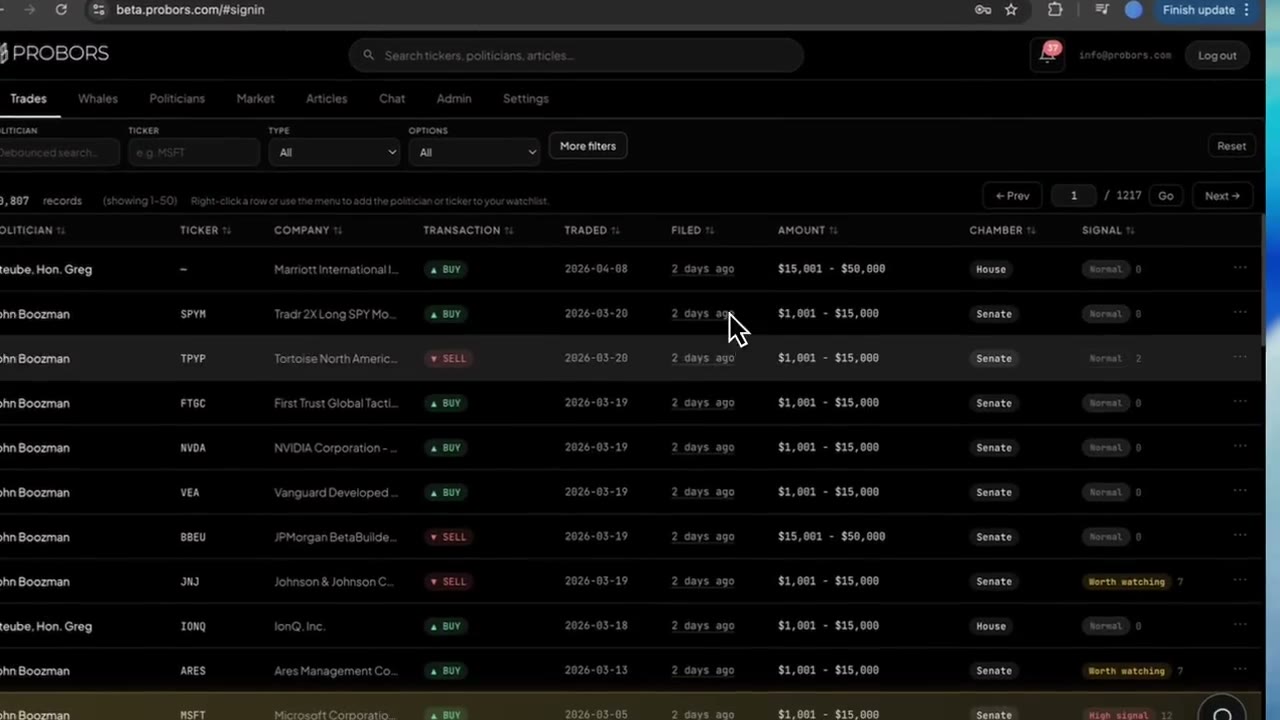
Choose ProBors when Form 4 rows are one layer in a repeat research process that also includes whale sizing, STOCK Act disclosures, alerts, and charts without exporting CSVs to other sites.
Many researchers keep OpenInsider bookmarked and use ProBors for the heavier daily loop. That overlap is normal.
Side-by-side comparison
| Capability | OpenInsider | ProBors |
|---|---|---|
| Primary focus | Free Form 4 insider transaction tables | Disclosure-first congress + insider + whale workspace |
| Insider buy/sell filters | Strong (ticker, role, cluster views) | Strong with whale notional context and drill-down |
| Congressional trade layer | No | Yes — House PTR and Senate periodic rows on same ticker |
| Watchlist + inbox alerts | Limited / none | Yes — ticker, politician, and disclosure-driven |
| Trade signal scores | No | Yes on congress and whale rows |
| Market charts next to filings | External | Built-in with optional disclosure markers |
| AI research on live disclosure data | No | Yes — table-style answers on trades and tickers |
| Price | Free | Freemium / paid tiers for advanced features |
| Best fit | Occasional insider scans | Daily disclosure research across insiders and congress |
What OpenInsider does well
OpenInsider earned its reputation by making SEC Form 4 activity easy to browse without an account. Researchers use it to:
- Pull recent insider purchases and sales by ticker or insider name
- Sort by filing date, transaction date, or dollar value bands
- Spot cluster buys when several insiders file in the same window
- Start research before paying for any subscription
For a single-ticker check — "did anyone at this company buy last month?" — it remains a practical first stop.
Where OpenInsider stops and ProBors picks up
OpenInsider is built around insider tables. It does not connect those rows to:
- Politician disclosures on the same symbol
- Whale-style notional context when you want large Form 4 lines separated from routine 10b5-1 plans
- Signal scoring that ranks congress and whale rows for triage
- Watchlist alerts when a ticker you track gets a new filing
- Market charts with disclosure markers in the same tab
That gap matters when your question is not "who bought?" but "does this insider cluster overlap with congress activity, and did the market already move?"
A practical research workflow on ProBors
If you are upgrading from an OpenInsider-only loop, this seven-step workflow mirrors what many ProBors users run daily:
- Start with the ticker — open the symbol you flagged on OpenInsider or from news.
- Review insider and whale rows — sort by filing date and note transaction code, role, and size band.
- Switch to congress on the same ticker — check whether any House or Senate disclosures landed in the same window.
- Read signal scores — use scores as triage hints, not buy/sell instructions; open the row detail for reasons.
- Open the market chart — compare transaction date to price action; remember filing lag can be days or weeks.
- Add to a watchlist — set alerts so the next filing hits your inbox instead of a manual refresh.
- Verify against the original filing — open the SEC or STOCK Act source before citing the row in notes or publishable work.
Steps 3–6 are where ProBors saves time compared with juggling OpenInsider, a congress tracker, and a charting site.
Common mistakes when comparing the two tools
- Treating filing date as trade date — both tools show both fields; always log both before sizing relevance.
- Assuming every Form 4 purchase is discretionary — grants, exercises, and plan-driven sales need different reading.
- Ignoring congress on hot insider tickers — insider clusters get more context when politician filings overlap.
- Expecting OpenInsider to alert you — without a watchlist elsewhere, you re-scan manually every day.
- Upgrading to ProBors without a repeat workflow — if you open insider data once a month, free tools may suffice.
When to choose each
Stay with OpenInsider if you:
- Check insider activity occasionally, not daily
- Do not follow congressional disclosures
- Are fine opening a separate charting site for price context
- Want zero subscription cost for basic Form 4 tables
Add or switch to ProBors if you:
- Stack insider whales and congress trades on the same ticker regularly
- Need watchlist alerts instead of manual refreshes
- Want signal scores and AI tables for triage
- Publish or share research and need one workspace for verification
What this does not prove
A row on OpenInsider or ProBors does not prove insider knowledge, future returns, or illegal trading. Form 4 filings are self-reported, can be amended, and often arrive after the market has already reacted. Congressional overlap on a ticker is correlation for research, not causation. Always read the original SEC filing before acting on any disclosure table.
FAQ
Is ProBors a replacement for OpenInsider?
Not necessarily. ProBors covers insider and whale activity plus congress, alerts, and market context. OpenInsider remains a useful free reference for quick Form 4 scans. Many researchers use both during a transition period.
Does OpenInsider show congressional trades?
No. OpenInsider focuses on SEC insider filings. Congressional STOCK Act disclosures live on separate House and Senate systems. ProBors combines both layers when you research a ticker.
Which tool is better for cluster buying research?
OpenInsider popularized cluster views for insider purchases. ProBors supports cluster-style triage through whale filters, signal scores, and cross-checking congress on the same symbol. Choose based on whether you need congress and alerts in the same pass.
Can I use ProBors without paying?
ProBors offers tiers with different limits. OpenInsider remains free for basic browsing. Compare current plans on probors.com against how often you research disclosures.
How do I verify a row before citing it?
Open the linked original filing on SEC EDGAR for Form 4 lines or on the official House or Senate disclosure site for congress rows. Cross-check dates, ticker spelling, and transaction type before treating any table row as final.
Research insiders and congress in one workspace
Use ProBors to triage Form 4 whales, STOCK Act filings, watchlists, and market context on the same ticker.
Get startedRelated reading
- Form 4 insider buying tracker
- Insider and whale tracker alternatives
- ProBors vs Unusual Whales
- Whale transaction tracking on ProBors
- How insider buying clusters work
Sources
- SEC Form 4 overview — official form instructions for insider ownership reports
- SEC investor bulletin: Forms 3, 4, and 5 — filing timing and insider definitions
- SEC EDGAR search — primary source for Form 4 verification
- Rows were checked in ProBors and should be verified against the original filing.
- Data ingestion status: probors.com/status
Sources & methodology
Last updated:
ProBors uses public disclosure records, SEC filings, House and Senate financial disclosure portals, market data, and in-product workflow checks. Articles are written as research education, not investment advice.