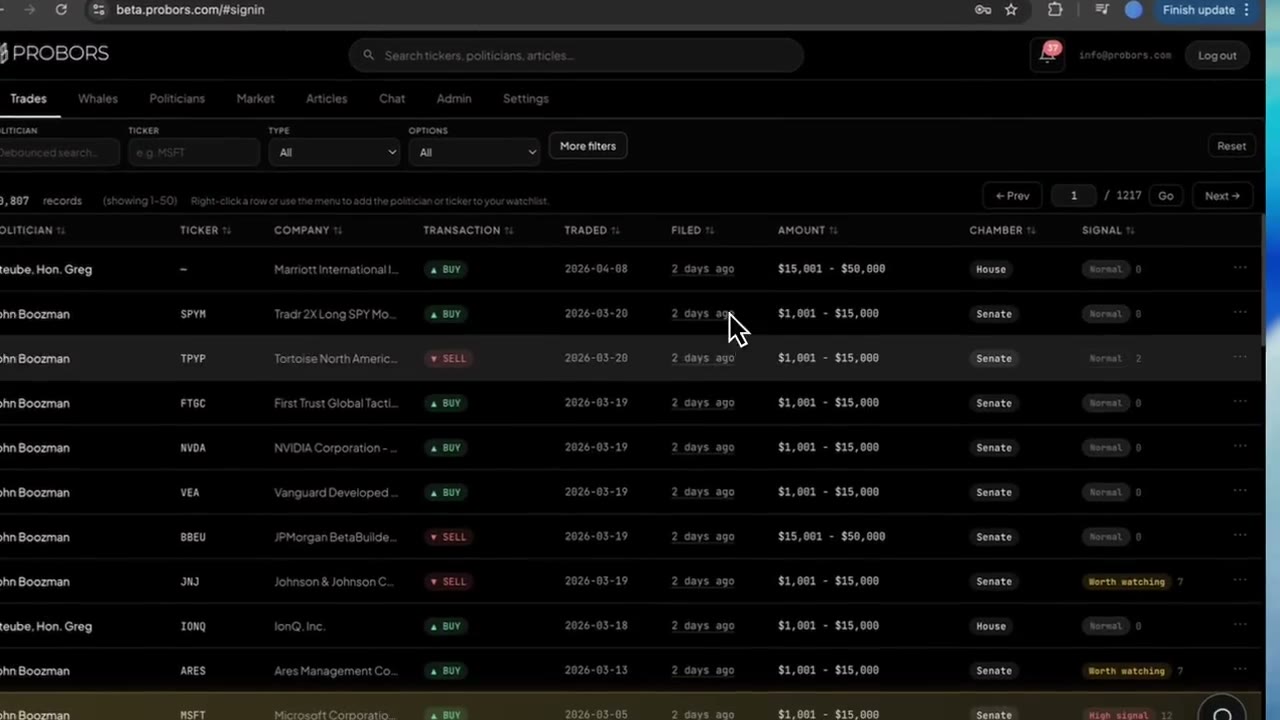
Filtering congress trades by signal score is the fastest way to shrink a noisy disclosure feed into a short morning read list. ProBors assigns each congressional row a score and label—Normal, Worth watching, or High signal—based on factors such as size bracket, timing, ticker history, and cross-market context. The score tells you what to open first; it does not tell you what to buy. This six-step workflow shows how to set the filter, read the label, verify filing lag, and cross-check the source PDF. This is research context, not investment advice.
When signal filtering helps
Congressional disclosure volume spikes after batch filings—one senator can add dozens of rows on a single filing date while routine House PTRs land the next business day. Without a filter, you either scroll everything or miss the rows that deserve a closer look.
Signal filtering is useful when you:
- Start a daily congressional scan and need a ranked queue
- Track a sector watchlist and want non-routine rows surfaced first
- Compare House and Senate activity without reading every Normal rebalance line
- Pair disclosure research with insider or whale context already scored on ProBors
Signal scores are a triage layer. They complement—not replace—reading transaction date, filing date, amount bracket, and the original STOCK Act form.
Six-step workflow on ProBors
-
Open Congressional trades on probors.com and sort by filing date descending so the newest public batches appear first.
-
Set a signal floor using the signal score filter. For a focused daily list, start at Worth watching (roughly score 6 and above in recent data). Widen to include Normal rows only when you are auditing a specific politician or ticker.
-
Add a date window—typically the last 7 to 30 days of filing dates—so you are not re-reading years of history every morning.
-
Scan labels before tickers. A Worth watching row with a 30-day filing lag may still be stale for price timing even if the score is elevated. Note both the label and the lag column.
-
Open the row detail for each shortlisted line. Read the signal reasons (first-time ticker, insider activity nearby, cluster of disclosures, price move since trade date). Cross-check transaction type and amount bracket against the linked source disclosure.
-
Cross-chamber check: filter the same ticker in House and Senate views. A high-signal Senate purchase plus a routine House sale in the same name tells a different story than either row alone.
-
Log or watchlist only after source verification. Add the ticker or politician to a watchlist if you want the next filing—not retroactive alerts on rows you already read.
Examples: same filing week, different scores
Recent filings in ProBors as of June 21, 2026 show why filtering matters. Senator John Boozman filed a large Senate batch on June 16 covering May trades; Representative Matthew Van Epps filed 13 House sales on June 17 for June 16 transactions. The batch sizes look similar, but signal labels diverge sharply.
| Politician | Chamber | Ticker | Type | Traded | Filed | Lag | Amount range | Signal |
|---|---|---|---|---|---|---|---|---|
| John Boozman | Senate | ECL | Sale | May 15, 2026 | June 16, 2026 | 32 days | $1,001–$15,000 | Worth watching |
| John Boozman | Senate | PLTR | Purchase | May 15, 2026 | June 16, 2026 | 32 days | $1,001–$15,000 | Worth watching |
| Matthew Van Epps | House | NVDA | Sale | June 16, 2026 | June 17, 2026 | 1 day | $1,001–$15,000 | Normal |
How to read these without overfitting:
- Boozman ECL (Worth watching) scored higher partly because ProBors flagged insider buying in the same ticker within the prior month and a prior opposite-side disclosure for that member—context a raw portal sort would not surface.
- Boozman PLTR (Worth watching) reflects first-time activity in that ticker for the member combined with a sizable price move in the weeks after the May 15 trade date—not a judgment about intent.
- Van Epps NVDA (Normal) is one line in a same-day, 13-ticker rebalance with next-day filing. Timely, but individually unremarkable in the scoring model—exactly the kind of row a signal filter helps you defer.
Use examples like these to calibrate your floor: if everything in your filtered view is a month-old Senate batch, lower the score threshold or narrow to purchases only—not because the scores are wrong, but because your question changed.
Common mistakes when filtering by score
- Treating Worth watching as a buy list. Scores rank disclosure interest, not expected returns.
- Ignoring filing lag. A high label on a five-week-old trade is still a lagging data point.
- Skipping Normal rows for one politician. Signal filters are global; member-specific research often requires turning the filter off.
- Forgetting amount brackets. A $1,001–$15,000 line and a $500,001–$1,000,000 line carry different weight even at the same score tier.
- Citing the score without the PDF. Always open the original House PTR or Senate periodic report before publishing or trading on a row.
For a deeper explanation of what each label means, see ProBors trade signal scores. For filing delay context, see STOCK Act filing delay explained.
FAQ
What signal score should I use for a daily congressional scan?
Start by showing only Worth watching and High signal rows filed in the last 14 days. If that returns fewer than five lines, widen the filing window before lowering the score floor—otherwise you reintroduce rebalance noise.
Does Normal mean the trade is unimportant?
Normal means the row did not trigger enough contextual flags for elevated triage. It can still matter for politician-specific research—especially timely House PTR lines in a broad sale batch.
Can I filter signal scores for one ticker only?
Yes. Open Congressional trades, enter the ticker, then apply the signal filter. This is the quickest way to ask whether recent congressional activity in NVDA, PLTR, or another name is routine or flagged.
How is this different from a watchlist alert?
Watchlists notify you when new activity hits names you follow. Signal filtering helps you prioritize whatever landed in the global feed today. Many researchers use both: filter first, then watchlist the tickers that survive source review.
Do Senate and House rows score the same way?
The same model runs on both chambers, but filing calendars and batch patterns differ. A Senate periodic report dump may produce several Worth watching lines at once; House PTRs often file faster with more Normal scores. Compare chambers explicitly when the ticker overlaps.
Triage congressional filings by signal score
Filter House and Senate rows on ProBors, open detail for flagged lines, and add verified tickers to your watchlist.
Get startedRelated reading
- ProBors trade signal scores
- How to read politician trade disclosures
- Track Congress stock trades by ticker
- Congress trades filed mid-June 2026
- Congress stock trading tracker hub
Sources
- House Clerk Financial Disclosure (PTR) search
- Senate Financial Disclosures (eFD)
- STOCK Act (Pub. L. 112-105)
- Rows were checked in ProBors and should be verified against the original filing.
- For ingestion health, see ProBors data status.
Sources & methodology
Last updated:
ProBors uses public disclosure records, SEC filings, House and Senate financial disclosure portals, market data, and in-product workflow checks. Articles are written as research education, not investment advice.