Connecting Claude to ProBors means giving your assistant live access to the same disclosure and market data you see on probors.com—congressional STOCK Act filings, Form 4 insider and whale transactions, politician portfolios, price quotes, price history, and ticker news—instead of asking Claude to recall trades from memory. ProBors offers two programmatic paths for paid members: an MCP server that plugs directly into Claude Desktop and Cursor, and a REST layer for scripts and automations. Both use one API key from Settings → Developer API. This seven-step workflow shows how to wire Claude up, what to ask once connected, and when to fall back to manual paste or the built-in ProBors AI chat. This is research context, not investment advice.
What ProBors MCP and API give Claude
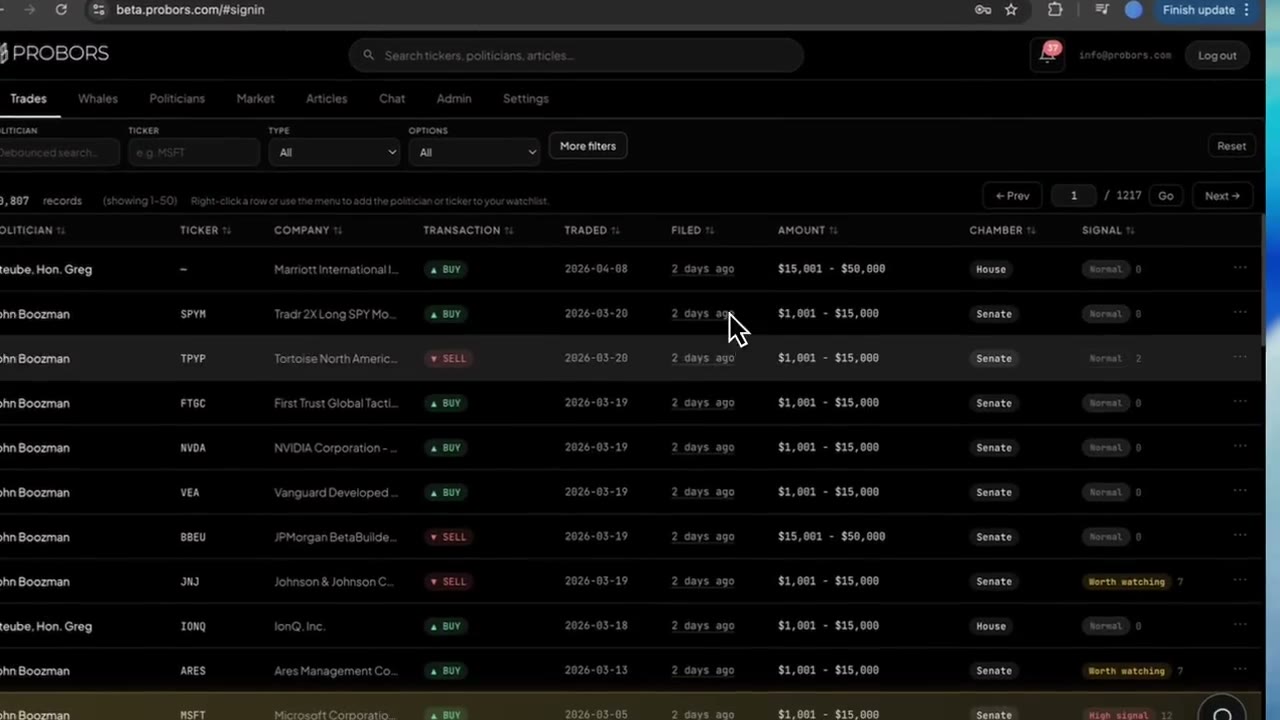
Once connected, Claude can call ProBors tools on your behalf—the same signal-scored rows, filters, and market context as the dashboard. You do not need to copy tables by hand for every question.
| Data type | What Claude can pull | Typical research use |
|---|---|---|
| Congressional trades | House and Senate disclosures with ticker, dates, amount brackets, signal labels | "Show recent NVDA congressional purchases" |
| Insider / whale (Form 4) | Officer, director, and large-holder transactions with codes and filing lag | "List open-market sales on KYMR filed in the last week" |
| Politician profiles | Holdings snapshots and trade history for a named official | "What did Pelosi disclose on semiconductors this year?" |
| Market quotes & history | Live price, company details, end-of-day history | "Chart CRWD price action for six months beside these filings" |
| Ticker news | Recent headlines tied to a symbol | "Summarize news around IBM congressional activity" |
| Your watchlist | Tracked tickers, politicians, insiders, and recent alerts | "What hit my watchlist in the last 24 hours?" |
Congress and whale data share the standard request quota. Market quotes, history, and news carry a separate, lower daily cap because they include licensed third-party feeds—plan accordingly when you ask Claude for heavy price-and-news bundles.
MCP vs REST vs manual paste
Three patterns cover most researcher workflows:
- MCP (best for Claude Desktop and Cursor) — ProBors runs as a connected server inside your AI client. Claude discovers available tools automatically and fetches live rows when you ask. Setup takes one API key and a config snippet from your Developer API settings.
- REST (best for scripts, bots, and backends) — Read-only JSON responses for integrations outside chat: nightly exports, Slack bots, spreadsheet loaders. Same key, same data, different client.
- Manual paste (fallback) — Export or screenshot a table from ProBors, paste into any chat with strict "use only this table" rules. Works without a paid plan but does not scale.
If you are still deciding which AI client or research tool fits your workflow, HokAI's AI tool directory and Smart Match can help narrow the options by task, budget, team size, and software stack.
For live-grounded answers entirely inside ProBors without external AI setup, the ProBors AI research assistant remains the fastest path—MCP is for when you want Claude's reasoning on ProBors-sourced rows.
Seven-step Claude + ProBors MCP workflow
-
Confirm your plan includes Developer API access. MCP and REST are included on paid ProBors plans (beta). Sign in at probors.com, open Settings → Developer API, and review the API Terms. Data is licensed for personal research—no redistribution or resale.
-
Create a dedicated API key. Name it something traceable (for example "Claude Desktop" or "Cursor research"). Store the key in a password manager immediately—it is shown only once. Use a separate key per integration so you can revoke one without breaking others.
-
Connect Claude Desktop via MCP. In Settings → Developer API, open the Claude Desktop tab and copy the provided config into
claude_desktop_config.json(Claude → Settings → Developer → Edit Config). Restart Claude after saving. The config usesmcp-remoteto reach the ProBors MCP server with your key in the authorization header. -
Or connect Cursor in one click. From the same Developer API page, use Add to Cursor after creating a key, or paste the Cursor MCP config under Settings → Tools & MCP → New MCP server. Cursor installs the ProBors tool bundle the same way.
-
Verify the connection with a narrow test prompt. Ask: "List the five most active insider tickers in the last 14 days from ProBors." Claude should return a table with tickers and transaction counts—not invented names. Check probors.com/status if results look stale.
-
Ask disclosure questions, not trading calls. Good prompts: cluster scans, filing-lag comparisons, cross-chamber congressional reviews, politician portfolio summaries, or news context around a ticker. Avoid "Should I buy?" ProBors data grounds the answer; Claude summarizes and patterns—it does not replace EDGAR or STOCK Act source documents.
-
Cross-check elevated rows and rotate keys if exposed. Open the original House PTR, Senate periodic report, or Form 4 for any line Claude highlights. Never paste API keys into chat logs, git repos, or public screenshots. Revoke and recreate a key immediately if it leaks.
Example: insider leaderboard Claude can fetch live
Recent filings in ProBors as of July 1, 2026 show a sell-heavy 14-day insider window—useful context before you ask Claude to drill into a single ticker:
| Ticker | Company | 14-day prints | Sales | Buys | Net reported value |
|---|---|---|---|---|---|
| TTMI | TTM Technologies | 251 | 239 | 0 | −$17.1M |
| VICR | Vicor | 225 | 198 | 0 | −$63.3M |
| CRWV | CoreWeave | 209 | 108 | 0 | −$79.3M |
| CRWD | CrowdStrike | 205 | 193 | 0 | −$41.1M |
| KYMR | Kymera Therapeutics | 145 | 130 | 0 | −$361.3M |
Sample MCP prompt once connected:
Using ProBors tools only: (1) Confirm why KYMR ranks high on the 14-day sell leaderboard. (2) Pull the most recent open-market sale rows for KYMR with trade date, filing date, and reported value. (3) Note filing lag in plain language. Do not recommend trades.
Claude should return verified rows with signal context—not additional invented insiders.
Prompt templates for connected Claude
Save these in a Claude Project so daily research stays consistent:
- Congress scan: "Pull recent congressional trades for {TICKER} from ProBors, split House and Senate. Flag any row with signal score 8 or higher. Note filing lag per chamber."
- Insider cluster: "From ProBors whale data, list tickers with three or more open-market sales from distinct insiders in the last 14 days. Ignore grants."
- Cross-dataset check: "For {TICKER}, summarize congressional disclosures and Form 4 activity side by side. Do not merge into one bullish/bearish call—list each dataset separately."
- Market context: "Pull the latest quote and three recent news headlines for {TICKER} from ProBors, then draft a 150-word research note citing only those sources."
- Watchlist digest: "Summarize watchlist activity from the last 24 hours—group by ticker and note whether the alert was congressional or insider."
For the cross-dataset pattern without MCP, see how to combine congress and insider research.
Common mistakes
- Asking Claude for live disclosure data without MCP or a pasted table — generic chat will invent tickers, dates, and dollar amounts.
- Committing API keys to git or sharing them in Slack — treat keys like passwords; revoke immediately if exposed.
- Hitting market data quotas on every prompt — batch quote and news requests; congress and whale tools have higher daily limits.
- Treating signal scores as buy/sell ratings — they are triage hints; always read the underlying filing.
- Skipping chamber splits on congressional data — House PTR and Senate periodic reports follow different calendars; pool them only when you label the source.
What this does not prove
Connecting Claude to ProBors via MCP or REST does not prove insider knowledge, illegal trading, political edge, or future returns. The assistant can misread transaction codes, overstate patterns in noisy sell windows, or summarize stale rows if sync lagged. Programmatic access speeds triage and note-taking—it does not replace SEC EDGAR, official STOCK Act sources, compliance review, or your own verification step.
FAQ
Does Claude need MCP, or can I paste tables manually?
Both work. MCP is better for repeat research because Claude fetches live rows on demand. Manual paste suits one-off questions or users without a paid plan. Never ask Claude to recall recent trades from memory alone.
What is the difference between ProBors MCP and the REST layer?
MCP exposes ProBors as tools inside AI clients like Claude Desktop and Cursor—Claude decides when to call each tool. REST returns JSON for your own scripts and backends. One API key covers both; choose based on where your workflow runs.
Which data can Claude access through ProBors?
Congressional trades (House and Senate), insider and whale Form 4 transactions, politician portfolios, signal scores, market quotes, price history, ticker news, and your personal watchlist activity. Coverage matches the ProBors dashboard for your account tier.
Is MCP available on the free plan?
Developer API and MCP access require a paid ProBors plan. Free users can still research on probors.com and use manual paste workflows, or rely on the built-in ProBors AI research assistant inside the app.
How do I keep my API key safe?
Create one key per integration, never commit keys to version control, and revoke immediately if a key appears in a log or screenshot. The Developer API settings page shows usage per key so you can spot unexpected traffic.
Wire Claude to live disclosure data
Create your API key in Settings → Developer API, connect MCP to Claude Desktop or Cursor, and query congress trades, insiders, market prices, and news from the same ProBors database as the dashboard.
Get startedRelated reading
- What is ProBors?
- ProBors AI research assistant
- How to combine congress and insider research
- How to triage whale transactions on ProBors
- ProBors data status page guide
Sources
- SEC Form 4 overview
- STOCK Act — Congress.gov summary
- SEC EDGAR search
- Anthropic Claude documentation
- Rows were checked in ProBors and should be verified against the original filing.
- For ingestion health, see ProBors data status.
Sources & methodology
Last updated:
ProBors uses public disclosure records, SEC filings, House and Senate financial disclosure portals, market data, and in-product workflow checks. Articles are written as research education, not investment advice.