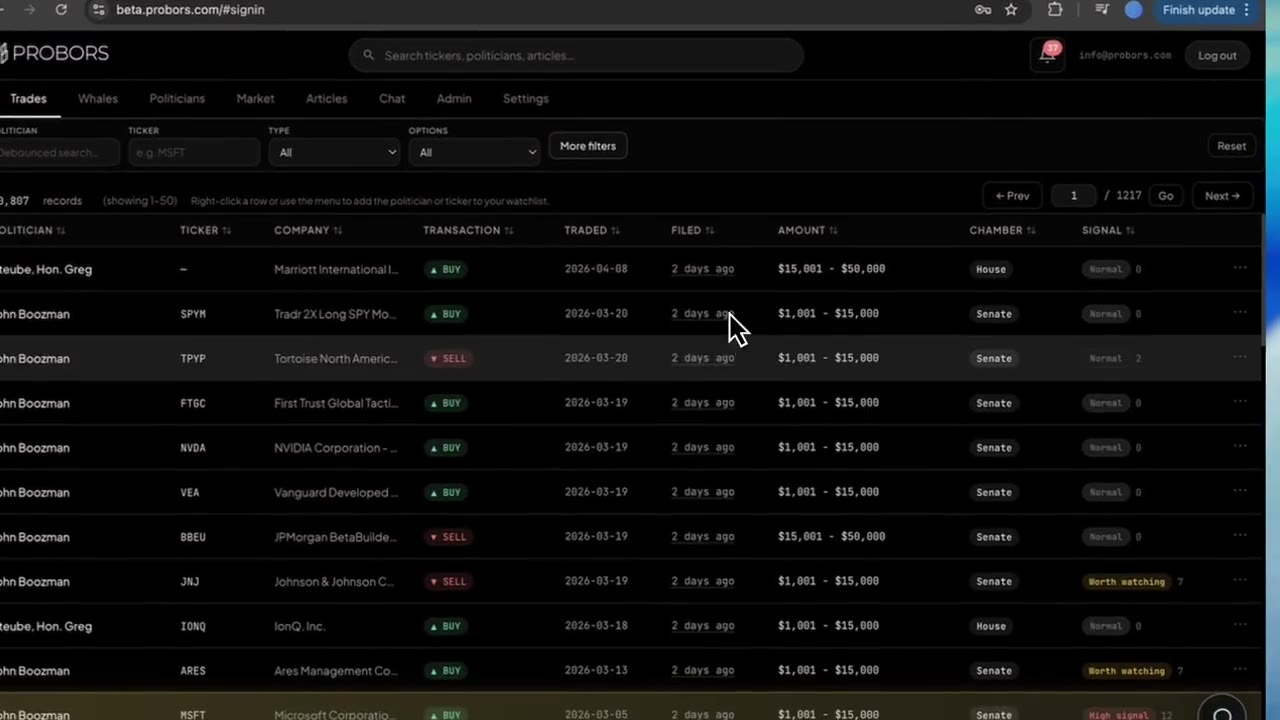
Morningstar is where many investors start for fund ratings, equity analyst notes, and portfolio planning tools built around long-term fundamentals. ProBors is built for public filing triage—House Periodic Transaction Reports, Senate periodic disclosures, insider whale lines, politician profiles, and market context on the same ticker. If you already rely on Morningstar for research quality scores and wonder whether it replaces a congressional trading tracker, the practical answer is no: Morningstar optimizes security analysis and fund selection, while ProBors optimizes filing dates, amount brackets, chamber filters, and verification before you cite a politician row. This comparison maps where each tool belongs so you do not confuse analyst coverage with STOCK Act self-reports. This is research context, not investment advice.
Quick answer
Choose Morningstar when mutual fund and ETF ratings, equity analyst reports, portfolio X-ray tools, and long-horizon valuation work drive your week—and politician trades are a rare headline.
Choose ProBors when House and Senate disclosure batches, filing lag, member-level history, and insider whale overlap on the same symbol are part of a repeatable research loop.
Many disclosure researchers keep Morningstar (or a similar fundamentals stack) for security selection, then open ProBors when a PTR batch posts, when they need to sort by filed date, or when a watched politician files again.
Side-by-side comparison
| Capability | Morningstar | ProBors |
|---|---|---|
| Primary focus | Fund and equity research, ratings, portfolio analytics | Congressional STOCK Act + insider whale disclosure workspace |
| Mutual fund / ETF ratings and category ranks | Core strength | Not the primary use case |
| Equity analyst reports and fair value estimates | Core strength | Not the primary use case |
| Congressional trade browsing | Not a dedicated PTR/Senate ledger | House and Senate rows with chamber filters |
| Filing date vs transaction date emphasis | Not designed for disclosure lag | Trade and filed dates on each row |
| Politician disclosure history | No member-level PTR timeline | Politician profiles and trade history |
| Insider Form 4 / whale context | Limited; not unified with congress rows | Whale module with optional signal scores |
| Watchlist alerts on new disclosures | Security and portfolio alerts | Inbox alerts on politicians and tickers |
| AI tables on live disclosure data | No | Yes — research chat on trades and tickers |
| Market charts with disclosure markers | External to disclosure workflow | Built-in workspace with optional congress markers |
| Best fit | Fund selection and fundamental equity research | Daily PTR triage, verification, and insider overlap |
What Morningstar does well
Morningstar built its reputation on independent fund analysis: star ratings, category peers, stewardship grades, and equity research that helps investors compare holdings without rebuilding spreadsheets. Typical workflows include:
- Screening mutual funds and ETFs by expense ratio, category, and risk profile
- Reading analyst notes before adding a position to a model portfolio
- Using portfolio X-ray or similar tools to see sector and style drift
- Tracking fair value estimates and economic moat narratives on individual stocks
If your question is “is this fund or stock a sensible long-term holding given its fundamentals?” Morningstar remains a strong answer. That is a different question from “what did this member file last week, and how late was the disclosure?”
Where Morningstar stops and ProBors picks up
Congressional disclosures are self-reported STOCK Act filings—not Morningstar fair value lines or fund category ranks. They arrive on House and Senate schedules with amount ranges, owner lines (self, spouse, joint), and gaps between trade date and filed date. Morningstar was not designed to sort those batches or alert you when a watched politician files again.
Researchers who cite politician trades in memos, newsletters, or social posts often need capabilities outside a fund-research stack:
- Structured PTR fields — transaction type, asset type, and amount band before you quote a dollar range
- Cross-chamber review — the same ticker may appear in House PTRs and Senate reports on different timelines
- Insider overlap — large Form 4 lines on a symbol that also shows up in a congressional filing deserve one workspace
- Repeatable triage — signal scores, lag-friendly sorting, and watchlists reduce manual portal checks
- Verification habit — compare ProBors rows to official House, Senate, and SEC sources before publishing
ProBors targets that loop without asking you to rebuild spreadsheets every time a periodic report drops.
When to choose each
Stay focused on Morningstar if you rarely open congressional disclosure sites, you do not maintain a politician watchlist, and politician trades never change how you size a position.
Add ProBors if you:
- Track specific members or committees and need alerts when new filings appear
- Compare filing date to transaction date as a standard step
- Stack congress activity with whale-sized insider lines on the same ticker
- Write recurring disclosure notes and want politician history without archive searching
Use both when Morningstar narrows your fund or equity list and ProBors confirms whether politicians or insiders filed on those names recently—then verify on official .gov sources before acting.
How to research disclosures on ProBors after Morningstar security work
- Finalize your ticker or fund holdings list from Morningstar screens or portfolio review.
- Open each equity symbol in ProBors global search and review recent House and Senate rows (funds and trusts may appear as asset names rather than a single ticker).
- Sort by filed date to see what landed in the last one to two weeks versus older trade dates.
- Open the politician profile for any row you might cite and scan prior filings for the same asset.
- Switch to the whale view on the ticker to see large insider activity in the same window.
- Cross-check amount brackets, dates, and owner lines on the official House or Senate disclosure site (and SEC EDGAR for Form 4).
- Save politicians or tickers to a watchlist if you expect follow-up filings.
What this does not prove
A politician’s disclosed purchase or sale in ProBors does not prove intent, inside information, or future price direction. Amount ranges are bands, not exact dollars. Filing lag can stretch weeks or longer on Senate periodic reports. Morningstar ratings and ProBors disclosure rows answer different research questions—combining them is workflow convenience, not a trading signal.
FAQ
Does Morningstar track congressional stock trades?
Morningstar may surface news or third-party summaries on high-profile politician trades, but it is not built as a structured House PTR and Senate periodic filing workspace. For batch triage, lag analysis, and member history, a disclosure-first tool like ProBors is a better fit.
Can ProBors replace Morningstar for fund research?
No. ProBors does not replace fund star ratings, category benchmarks, or equity analyst fair value workflows. Use Morningstar (or your existing fundamentals stack) for security selection; use ProBors when STOCK Act and insider filings matter.
Which tool is better for journalists covering Congress and markets?
Journalists often keep Morningstar for quick fund context on a portfolio story and ProBors for verified filing fields, politician timelines, and cross-chamber ticker checks before publication.
Do I need both subscriptions?
Not always. If you never cite politician trades, Morningstar alone may suffice. If politician and insider disclosures are core to your beat, ProBors is usually worth adding even if you keep Morningstar for fundamentals.
How should I verify a row before sharing?
Open the original House or Senate filing from the official disclosure portal, match transaction type and amount bracket to the ProBors row, and note filing lag in plain language. See how to verify congressional trade disclosures before sharing.
Track disclosures with ProBors
Review House and Senate filings, insider whales, and market context in one workspace—then verify on official sources.
Get startedRelated reading
- Stock Rover vs ProBors: portfolio research vs disclosure work
- Koyfin vs ProBors: congress disclosure research compared
- How to read politician trade disclosures
- Best congress stock trading trackers in 2026
Sources
- U.S. House of Representatives — Financial Disclosure Reports
- U.S. Senate — Public Financial Disclosures
- SEC — EDGAR search for Form 4 insider filings
- Congress.gov — STOCK Act background
- Rows were checked in ProBors and should be verified against the original filing.
- Ingestion health for readers: https://probors.com/status
Sources & methodology
Last updated:
ProBors uses public disclosure records, SEC filings, House and Senate financial disclosure portals, market data, and in-product workflow checks. Articles are written as research education, not investment advice.