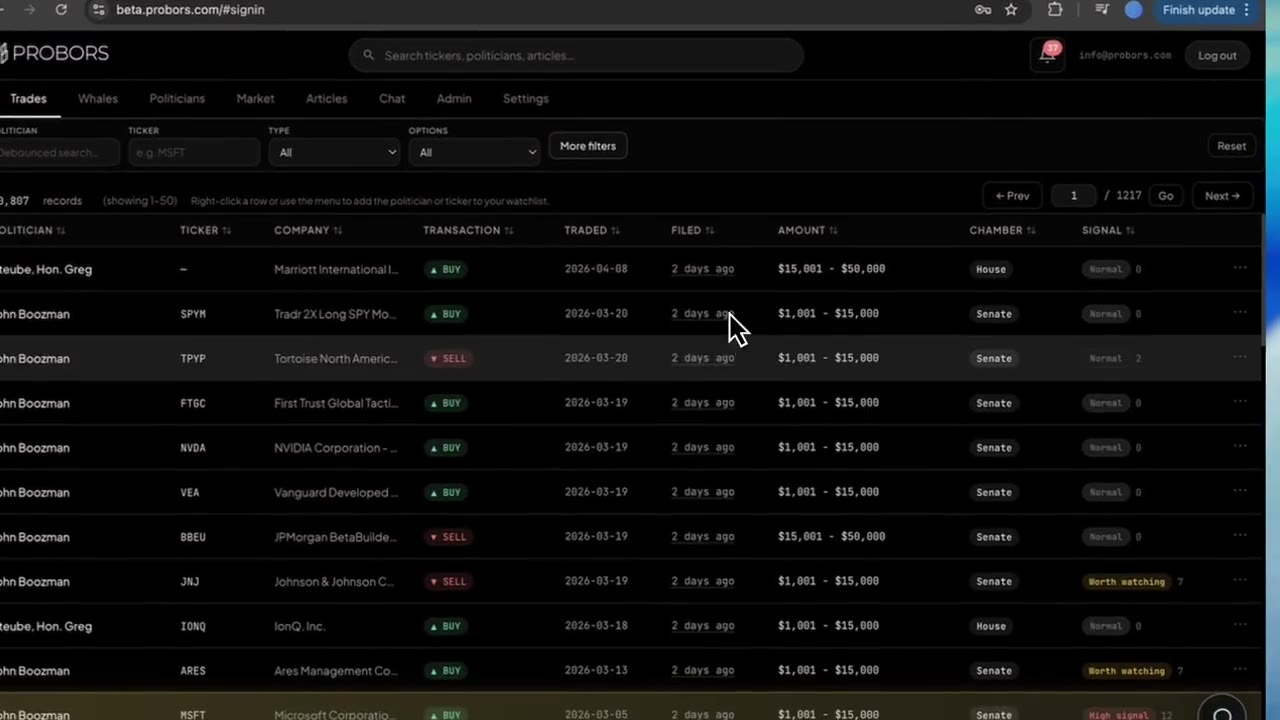
Congressional and insider tables move fast on Monday mornings. ProBors shows relative phrases in the Filed column—Today, Yesterday, 3 days ago, 2 weeks ago—so you can spot fresh batches without mentally converting timestamps. When you need the exact day for lag math, a memo footnote, or a comparison to the Traded column, hover the same cell and the label swaps to a plain YYYY-MM-DD date. Traded stays in fixed numeric form on Trades so transaction timing stays stable while filing freshness stays scannable. This is a product walkthrough for disclosure researchers, not investment advice.
Quick answer
Sign in at probors.com, open Trades or Whales, and sort by Filed when you want the newest public records on top. Read relative labels for triage; hover Filed (and on Whales, Trade or Filing when those columns use the relative control) to reveal the calendar date before you compute filing lag or cite a row. Open the disclosure context window for the full timeline, then confirm dates on the official House PTR, Senate periodic report, or Form 4 PDF.
Why Trades uses two date styles
STOCK Act research always involves two clocks: when the trade happened and when the form became public. ProBors separates how each date is displayed on purpose.
| Column | Display style | Best for |
|---|---|---|
| Traded | Fixed YYYY-MM-DD | Comparing transaction timing across rows, sorting by trade date, pairing with chart markers |
| Filed | Relative phrase by default | Morning scans—“what landed recently?” |
| Filed (hover) | YYYY-MM-DD | Lag math, citations, cross-checking against PDF headers |
Relative labels use calendar days in your local timezone, not exchange session cutoffs. A row filed after midnight local time may read Today even if you finished research yesterday evening—hover to lock the official calendar day before you publish.
Step 1: Sort and scan the Filed column on Trades
- Open Trades from the dashboard header—see the Trades tab guide for chamber badges and filter habits.
- Click the Filed header (or choose Recent first in More filters) so the newest disclosures rise to the top.
- Scan the Filed column for Today and Yesterday first when you are running a daily queue.
Pair this pass with column sorting when you want ascending filed dates for historical memo work instead of a freshness-first scan.
Step 2: Hover for the exact filing date
Move your pointer over any Filed cell that shows a relative phrase. ProBors replaces the phrase with the numeric filing date while you hover; move away and the friendly label returns so row height stays stable.
Use hover when you need to:
- Subtract Traded from Filed to estimate filing lag in whole days
- Match a row to a batch timestamp on probors.com/status after a slow Senate upload
- Copy a precise date into a research memo or spreadsheet
The cell also exposes the numeric date to assistive tech as a combined label (phrase plus calendar day). If the filing date is missing upstream, the cell shows an em dash—treat that as a data gap to verify on the source form, not as proof of same-day filing.
Step 3: Read the same pattern on Whales
On Whales, relative dating appears on Trade and Filing columns for large Form 4 prints—see the Whales tab guide for badge hover triage on the same rows.
Insider workflows often compare when the insider traded with when EDGAR accepted the filing. Hover each relative cell before you assume a print is “fresh”; a 1 week ago filing can still describe a trade from months earlier when reporting rules allow delayed lines.
The disclosure context window repeats the same relative control in its timeline cards, so dates stay consistent whether you opened the row from Trades, Whales, or a politician profile table.
Step 4: Connect relative dates to lag and verification habits
Relative labels answer recency; they do not replace lag analysis.
- Hover Filed and note the calendar filing day.
- Read Traded in the same row (numeric on Trades).
- Compute whole-day lag: filing date minus trade date.
- When lag looks unusually long, open detail and the original filing link—Senate backfills and amended PTRs often explain apparent delays.
For conceptual background on why delays happen, see STOCK Act filing delay explained and how to compare filing date vs transaction date. For a repeatable lag screen, use how to screen congress trades by filing lag.
Step 5: Fold relative dates into a weekly rhythm
Many researchers use relative Filed labels as the first filter and numeric dates as the verification step:
- Sort Trades by Filed descending; note rows labeled Today through 3 days ago.
- Hover survivors to capture exact filing days for your log.
- Cross-check any high-signal row in the context window before watchlist follows—see row watchlist follow.
- Switch to Whales on tickers that matter and repeat hover on Filing when insider overlap is part of the story.
- If relative labels stall (everything reads 2 months ago during a known busy week), check data status before assuming members stopped filing.
What this does not prove
A Today label means ProBors ingested a filing dated on that calendar day—it does not prove the politician traded today, that the market reacted to the disclosure, or that the row is material. Relative phrasing is a display convenience, not a legal timestamp. Always treat the signed PDF as authoritative when dates disagree with parsed fields.
FAQ
Why is Traded numeric but Filed relative?
Transaction dates anchor chart markers and cross-row comparisons; filing dates answer “what is new in the feed?” Relative Filed labels reduce cognitive load during high-volume House PTR weeks while hover preserves precision.
Do relative labels update if I leave the tab open?
Yes. Labels recompute against the current local calendar day when the table refreshes. A row that read Yesterday can read 2 days ago after midnight without any change to the underlying filing.
Can I sort by Filed while reading relative text?
Yes. Sorting uses the underlying filing date, not the phrase length. After sorting, hover any row that matters for exact lag math.
Does the Politicians tab use the same control?
Recent disclosure tables on politician profiles use the same relative Filed pattern on applicable columns, consistent with the main Trades feed.
Should I cite relative phrases in journalism?
No. Cite the calendar filing date from hover or the official form. Phrases like 3 days ago go stale the moment you publish.
Scan fresh filings, verify exact dates
Use ProBors relative Filed labels for morning triage, then hover for calendar days and open official disclosures before you share.
Get startedRelated reading
- How to compare filing date vs transaction date
- ProBors Trades tab guide
- ProBors Whales tab guide
- STOCK Act filing delay explained
Sources
- U.S. House Clerk — Financial Disclosure
- U.S. Senate eFD search
- STOCK Act — Congress.gov summary
- Rows were checked in ProBors and should be verified against the original filing.
- Ingestion health: probors.com/status
Sources & methodology
Last updated:
ProBors uses public disclosure records, SEC filings, House and Senate financial disclosure portals, market data, and in-product workflow checks. Articles are written as research education, not investment advice.