Congressional trades during earnings season are easy to misread because two clocks run at once: the company’s public results calendar and the STOCK Act’s periodic transaction report schedule. A November filing can describe an October transaction that landed days before or after a quarterly report. On ProBors you research those rows by anchoring on transaction date, measuring filing lag, and only then asking whether the ticker move had anything to do with the disclosure. This seven-step workflow is for disclosure researchers and journalists who want repeatable notes—not hot takes on every semi-equipment or megacap line. This is research context, not investment advice.
Why earnings season changes your disclosure workflow
Earnings windows concentrate price moves, headlines, and social clips on the same tickers that often appear in congressional PTRs. That overlap creates three predictable traps:
- Filing date noise. Sorting only by “what landed this week” surfaces rows whose trades happened before the earnings print you are studying—or long after the market already digested the quarter.
- Chamber timing mix. House PTRs often file within days of the trade; Senate periodic batches routinely arrive weeks later. The same earnings week can include both fresh House lines and stale Senate lines on related sectors.
- Bracket size illusions. A $1,001–$15,000 purchase line on a megacap is structurally smaller than the float reaction around earnings; the interesting question is timing and pattern, not dollar precision.
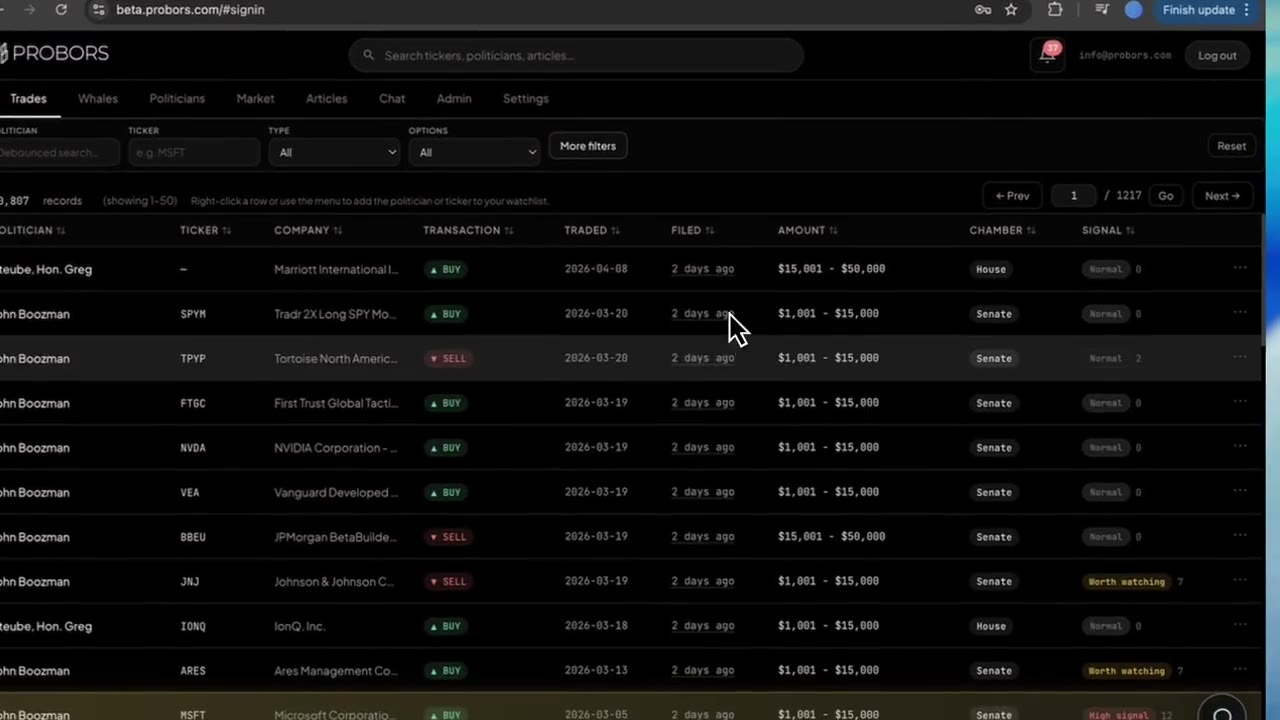
ProBors keeps transaction date, filing date, amount brackets, and signal labels on one row so you can separate “member filed during earnings week” from “member traded around the earnings window.” Pair this workflow with filing lag screening and comparing filing vs transaction dates when your beat gets crowded.
Seven-step earnings-season workflow on ProBors
-
Name the earnings window first. Before opening trades, write the report date (or your best public estimate) and the three trading days before and after. That window is your primary frame—not today’s filing date.
-
Open Congressional trades and sort by filing date descending. Note today’s calendar date. You are screening what became public recently, not assuming those trades happened recently.
-
Filter or search for your ticker or sector bucket. Use global search or ticker filters for names in the earnings stack you follow (for example semiconductors, large-cap consumer, or megacap tech). Keep House and Senate visible unless your question is chamber-specific.
-
Shortlist rows whose transaction date falls inside your earnings window. For each candidate, record transaction date, filing date, lag in whole days, chamber, transaction type, and amount bracket. Phrase lag plainly: “9-day lag” or “filed about three weeks after the trade.”
-
Open market context on the same ticker in ProBors. From the trade row, move into the ticker workspace or chart view described in the market chart congress markers guide. Mark where the transaction date sits relative to the earnings candle—not where the filing date sits.
-
Read signal labels as triage, not conclusions. Worth watching and similar tiers reflect filing history and context inside ProBors. During earnings season, a labeled row still needs lag and window checks—see signal score filtering for how to use tiers without overfitting.
-
Verify in the original PTR before you publish or trade on the story. Follow the disclosure link to the House Clerk or Senate eFD PDF. Confirm ticker spelling, owner (member vs spouse vs trust), and transaction type. If structured fields disagree with the PDF, trust the PDF. For shareable blurbs, run the verification checklist.
Examples from recent filings
Recent filings in ProBors as of November 8, 2026 show why the earnings window matters more than the filing headline. The table is deduplicated—identical politician, ticker, type, trade date, filing date, amount, and chamber appear once.
| Politician | Chamber | Ticker | Type | Traded | Filed | Lag | Amount range | Signal |
|---|---|---|---|---|---|---|---|---|
| Maria Elvira Salazar | House | NVDA | Purchase | October 23, 2026 | November 1, 2026 | 9 | $1,001–$15,000 | Worth watching |
| Josh Gottheimer | House | AMAT | Purchase | October 26, 2026 | November 4, 2026 | 9 | $1,001–$15,000 | Worth watching |
| Josh Gottheimer | House | TLK | Sale | October 15, 2026 | November 4, 2026 | 20 | $1,001–$15,000 | Worth watching |
How to read these without overfitting:
- Salazar NVDA (9-day lag) became public in early November while many investors were still discussing October semiconductor earnings. The purchase transaction date still sits in late October—your earnings memo should cite that trade date, not November 1 alone. For ticker-specific history, see NVIDIA congressional disclosures explained.
- Gottheimer AMAT (9-day lag) is another late-October equity line in a sector with dense fall reporting. Worth watching reflects ProBors context; it does not prove the member traded ahead of a specific print.
- Gottheimer TLK (20-day lag) shows how one filing batch mixes lag buckets. The sale’s transaction date is mid-October while the filing landed with the November 4 cluster—treat it as background when writing “this week’s Congress trades.”
For the broader early-November filing week, see Congress trades filed early November 2026.
Common mistakes during earnings season
- Using filing week as a proxy for “traded during earnings.” Always compare transaction date to the earnings window.
- Ignoring chamber lag norms. A Senate batch filed during earnings week may describe trades from the prior month—see stale Senate batch investigation.
- Treating small brackets like institutional flow. Amount ranges are bands, not exact dollars—see why congressional amount ranges are not exact dollars.
- Skipping cross-chamber ticker reads. Members in different chambers can disclose the same symbol in the same season; use ticker research across House and Senate.
- Publishing before opening the PDF. Earnings-season headlines amplify errors on option lines, trust accounts, and amended forms.
What this does not prove
A congressional trade dated near an earnings report does not show illegal insider trading, committee foreknowledge, or a repeatable trading edge. Members file on periodic schedules, spouses and trusts appear on many lines, and markets often move before delayed Senate batches become public. Signal labels and ProBors charts help you prioritize research—they are not investment recommendations.
FAQ
Should you sort congressional trades by filing date or transaction date during earnings?
Use filing date to see what became public recently, then transaction date to decide whether a row belongs inside your earnings window. Most earnings-season mistakes come from skipping the second step.
Does a trade the week before earnings mean the member anticipated results?
Not by itself. Many disclosures are routine rebalancing, advisor-managed accounts, or unrelated timing. Your memo should list alternative explanations and cite the original PTR.
How do House PTRs and Senate batches behave in the same earnings month?
House lines often show shorter lag; Senate periodic reports frequently cluster with multi-week delay. Compare within chamber before you call a row “timely for earnings.”
Can ProBors show whether insiders traded the same ticker in the same window?
Yes—switch to whale and insider views or use the combined workflow in how to combine congress and insider research. Congressional and Form 4 feeds answer different legal and timing questions.
Where should you check whether ProBors has caught the latest PTR batch?
Open ProBors data status if filing dates look behind the official House or Senate portals.
Align PTR dates with your earnings calendar
Sort congressional trades on ProBors, compare transaction and filing dates, and verify source disclosures before you publish.
Get startedRelated reading
- How to compare filing date vs transaction date
- How to screen congressional trades by filing lag
- How to research a ticker across House and Senate
- How to run a weekly congress disclosure review
- STOCK Act filing delay explained
Sources
- STOCK Act (S. 2038, 112th Congress)
- House Committee on Ethics — Financial Disclosure
- Senate Select Committee on Ethics — Financial Disclosure
- SEC — Investor resources on insider reporting
- ProBors data status
- Rows were checked in ProBors and should be verified against the original filing.
Sources & methodology
Last updated:
ProBors uses public disclosure records, SEC filings, House and Senate financial disclosure portals, market data, and in-product workflow checks. Articles are written as research education, not investment advice.