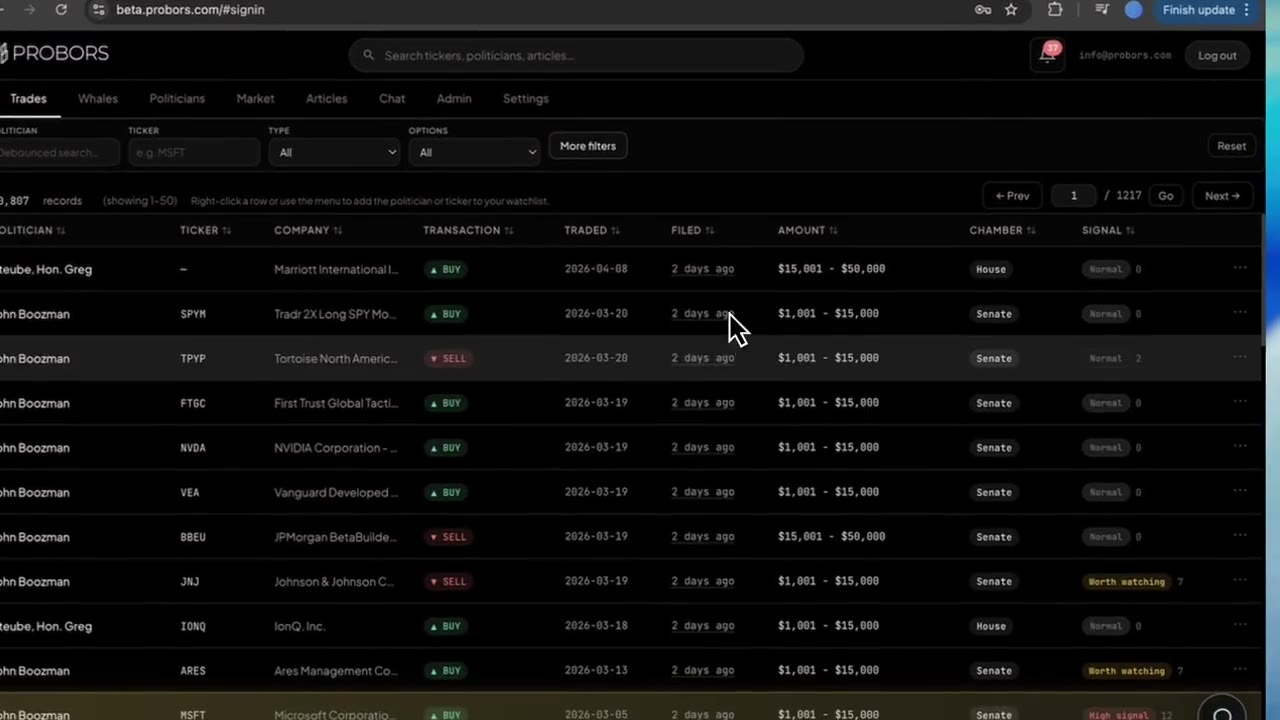
LegiStorm is a veteran resource for congressional staff, financial disclosure records, and STOCK Act periodic transaction reports in an archive-first format. ProBors is a disclosure research workspace that normalizes House and Senate trades, layers insider whale activity, signal scoring, and market charts on the same ticker. If you need a historical PTR lookup tied to Capitol Hill operations, LegiStorm may be enough. If you monitor dozens of tickers and politicians every week, you need alerts, cross-chamber filters, and faster triage than a static archive allows. This is research context, not investment advice.
Quick answer
Choose LegiStorm when your job is to find, cite, or audit official congressional disclosure documents—including PTR history, financial disclosure forms, and related Hill records.
Choose ProBors when you run a repeat loop across congress trades, insider whales, watchlists, and charts—and want ranked tables before you open each original filing.
Many journalists and compliance-minded researchers verify the government copy on House or Senate portals (or LegiStorm’s archive) and use ProBors for daily screening. That pairing is sound.
Side-by-side comparison
| Capability | LegiStorm | ProBors |
|---|---|---|
| Primary focus | Congressional financial disclosure archive (PTRs, forms, staff data) | Unified congress + insider whale research workspace |
| House and Senate trade search | Yes — document and member-centric archive | Yes — filterable feed with shared column layout |
| Insider Form 4 and whale rows | No — congress-centric | Yes — alongside congress on the same ticker |
| Historical PTR archive | Strong — long-running Capitol Hill dataset | Growing feed with emphasis on active research |
| Trade signal scores for triage | No | Yes on congress and whale rows |
| Watchlist + inbox alerts | Limited compared to dedicated trackers | Yes — ticker, politician, and disclosure-driven |
| Market charts next to filings | No | Built-in with optional disclosure markers |
| AI research on live disclosure data | No | Yes — table-style answers on trades and tickers |
| Best fit | Document retrieval, Hill staff context, archival citation | Daily monitoring, cross-source triage, active watchlists |
What LegiStorm does well
LegiStorm built credibility among reporters, staffers, and transparency advocates by collecting congressional disclosure paperwork in one place. Typical LegiStorm use cases include:
- Pulling a member’s periodic transaction report history for a story
- Cross-referencing financial disclosure forms with staff rosters
- Confirming that a PTR was filed during a news cycle
- Supporting accountability reporting with long-run disclosure archives
LegiStorm is not trying to be a trading terminal. Its strength is official Hill disclosure context—who filed, when the PDF landed, and how that record fits the broader ethics ecosystem.
Where LegiStorm stops and ProBors picks up
LegiStorm optimizes for archival lookup. Researchers who live in repeat monitoring loops often hit friction:
- No insider layer — Form 4 whale activity on the same ticker requires a separate tool.
- Archive pace vs market pace — breaking news may need same-day triage across chambers, not only document retrieval.
- Limited cross-ticker analytics — asking “who traded NVDA in the last 90 days across chambers?” is manual unless you export and reconcile.
- No native signal ranking — every PTR row looks equally loud until you apply your own filters.
- Alerts are not the core product — proactive monitoring usually means bookmarks, RSS habits, or a second tracker.
ProBors does not replace LegiStorm for deep archival citation or staff roster research. It compresses the daily disclosure loop: filter, rank, watchlist, chart, then click through to verify on the original filing when a row matters.
How to combine LegiStorm and ProBors
A practical hybrid many disclosure researchers use:
- Start in ProBors for triage — sort recent House and Senate rows by filing date or signal score.
- Note transaction date and filed date — log both before inferring timing edge.
- Open the original PTR — use ProBors source links or search House Clerk Financial Disclosures and Senate eFD.
- Cross-check with LegiStorm — confirm archive history or staff context when the story is Hill-specific.
- Layer insider whales on the same ticker — see whether Form 4 activity overlaps with the congressional row.
- Add to a watchlist — let the next filing hit your inbox instead of refreshing archives manually.
- Archive the government URL in your notes — keep the
.govlink for anything you might publish.
Steps 1, 5, and 6 are where ProBors saves time; steps 3, 4, and 7 are where LegiStorm and official portals keep you accurate.
When to choose each
Stay with LegiStorm (and official .gov sources) if you:
- Need long-run PTR and financial disclosure history for accountability reporting
- Rarely cross-check insider Form 4 activity
- Open congressional disclosures a few times a month for one member or one story
- Prioritize staff roster and Hill operations context over market charts
Choose ProBors if you:
- Monitor congress and insider whales on the same ticker daily
- Want signal-ranked tables before opening every PDF
- Need watchlist alerts when a politician or symbol hits your list
- Prefer charts and news next to the filing instead of tab hopping
Use both if you publish externally: ProBors for triage, LegiStorm or .gov for final citation.
What this does not prove
A comparison table cannot tell you which tool predicts markets. LegiStorm’s archive depth does not imply trade timing edge, and ProBors signal scores are triage aids—not buy or sell instructions. Filing lag under the STOCK Act can be weeks, and amount fields are ranges, not exact dollars. Always verify rows on the original filing before sharing.
FAQ
Is ProBors a LegiStorm replacement for journalists?
Not necessarily. LegiStorm remains useful for archival PTR history and Hill staff context. ProBors is built for faster congress-and-insider monitoring with alerts and charts.
Does LegiStorm include Senate and House trades?
LegiStorm covers congressional financial disclosures including periodic transaction reports. Layout and search habits differ by chamber on every platform—verify each row on the official source.
Can I use only official government sites instead of either tool?
Yes. House PTR search and Senate eFD are free and authoritative. Paid workspaces trade convenience and cross-source joins for that manual work.
Does ProBors include staff salary data like LegiStorm?
No. ProBors focuses on tradable disclosure rows, insider whales, and market context—not Capitol Hill payroll archives.
Which tool is better for a one-off story on a single politician?
For a single deep dive with archival PDFs, LegiStorm plus .gov links may suffice. For ongoing follow-up on the same member and tickers, ProBors watchlists reduce refresh fatigue.
Track congress and insider disclosures in one workspace
Use ProBors to filter House and Senate trades, triage whale rows, and verify against original filings.
Get startedRelated reading
- House Stock Watcher vs ProBors
- SEC EDGAR vs ProBors disclosure workflow
- Capitol Trades alternative guide
- How to verify congressional trade disclosures before sharing
Sources
- House Clerk Financial Disclosure database
- Senate eFD search
- STOCK Act text (Congress.gov)
- SEC Form 4 overview
- Rows were checked in ProBors and should be verified against the original filing.
- Ingestion health: ProBors data status
Sources & methodology
Last updated:
ProBors uses public disclosure records, SEC filings, House and Senate financial disclosure portals, market data, and in-product workflow checks. Articles are written as research education, not investment advice.